
How to Deploy Tracearr: Unified Plex, Jellyfin, and Emby Monitoring with Docker Compose
Tracearr is a modern, unified telemetry, stream analytics, and security management platform for Plex, Jellyfin, and Emby media servers featuring self-hosted vector stream maps and automated trust scoring. Learn how to deploy Tracearr with Docker Compose, TimescaleDB, and Redis, connect your media servers, and monitor playback across your homelab.
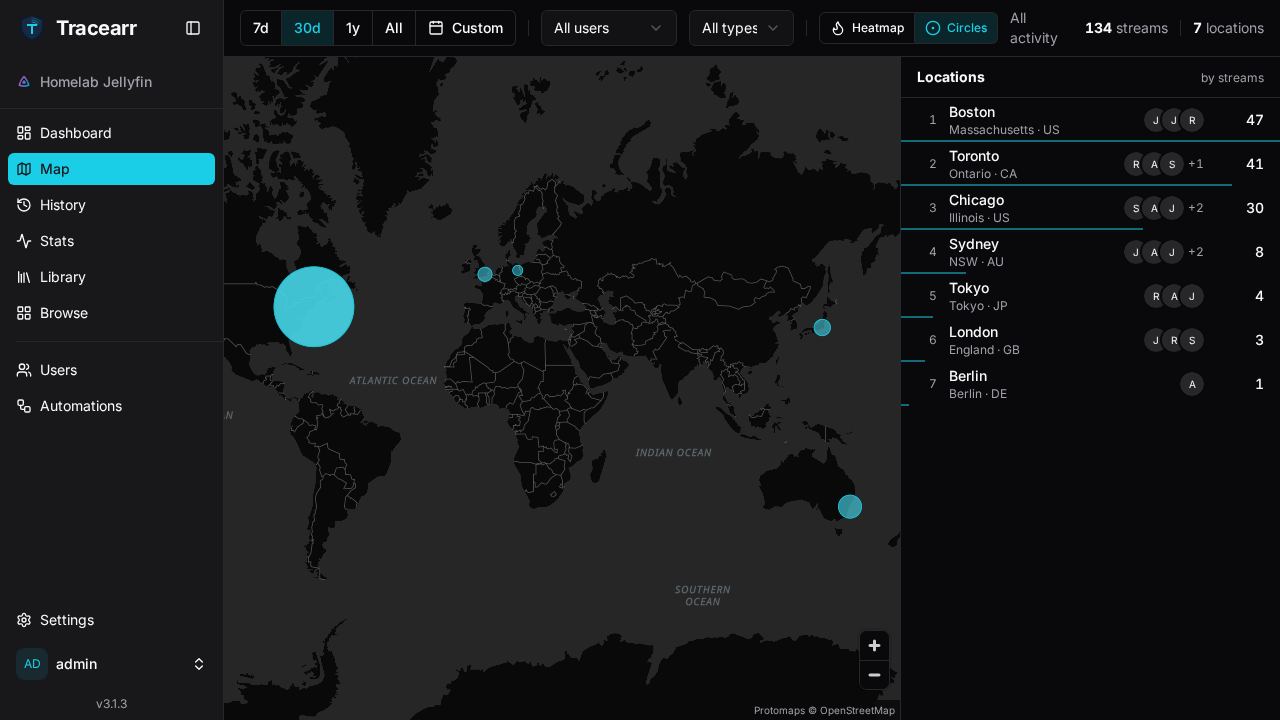
Tracearr is an open-source, unified monitoring and security platform for Plex, Jellyfin, and Emby media servers, licensed under the GNU Affero General Public License v3.0 (AGPL-3.0). Homelab operators who share media collections with friends and family frequently encounter monitoring blind spots: who is actively streaming, whether content is direct playing or saturating the host CPU with software transcodes, whether users are streaming from unexpected geographic locations, and whether passwords are being shared across multiple households.
While Tautulli is limited strictly to Plex and Jellystat is tailored to Jellyfin and Emby, Tracearr bridges the gap by delivering a single, cohesive dashboard across all three server platforms. Tracearr correlates viewing activity across disparate servers into unified user identities, tracks playback sessions in a TimescaleDB hypertable, enriches client IP addresses with offline geolocation, and visualizes streams on a self-hosted vector world map without external tile service dependencies.
Core Capabilities and Architecture
- Multi-Server Live Telemetry: Connects Plex, Jellyfin, and Emby to a single interface. The dashboard displays real-time playback sessions, container codecs, direct play versus transcode decisions, bandwidth consumption, and per-server CPU, memory, and network throughput metrics.
- Offline Vector Stream Map: Geolocates incoming client IP addresses using embedded MaxMind GeoLite2 databases and projects active streams onto an embedded, self-hosted vector basemap (
basemap.pmtiles). No third-party Mapbox or Google Maps API keys are required. - Cross-Server Identities & Trust Scoring: Automatically reconciles accounts across platforms (e.g. a Plex account and a Jellyfin account belonging to the same user) into a single identity. Every identity maintains a dynamic trust score (0–100) that decreases upon rule infractions like simultaneous geographic streaming or impossible travel.
- Automations & Multi-Channel Alerting: Features 18 event triggers (stream start/stop, impossible travel, concurrent streams, new device, server health state changes) and 22 built-in automation templates. Configurable actions dispatch real-time notifications to Discord, generic webhooks, ntfy, Gotify, Apprise, Pushover, SMTP email, mobile push, and web UI toasts.
- Modern Production Architecture: Engineered with a Node.js 24 Fastify v5 backend, Drizzle ORM on TimescaleDB HA (PostgreSQL 18), Redis 8 BullMQ job queues, Better Auth session management, and a React 19 single-page application.
- Programmatic REST API: Exposes a key-authenticated public REST API (
/api/v1/public) usingtrr_pub_bearer tokens, accompanied by interactive OpenAPI / Scalar documentation at/api-docs.
---
Prerequisites
Before deploying Tracearr, verify that your host system satisfies the following technical requirements:
- Operating System: Linux (Ubuntu 22.04/24.04 LTS, Debian 12+, Rocky Linux, Fedora, Arch Linux), macOS, or Windows via WSL2.
- Container Runtime: Docker Engine 20.10+ with Docker Compose v2 (
docker compose versionv2.24+ recommended). - Hardware Resources:
- CPU: 2 vCPU cores recommended (Fastify backend, TimescaleDB background workers, and Redis). - Memory: 2 GB to 4 GB RAM recommended (TimescaleDB shared memory is configured to 512 MB). - Storage: 10 GB+ free disk space for container images, persistent TimescaleDB database volumes, and media poster cache.
- Network Ports: An available host port for the web interface and REST API (default
3000). - Media Server: An accessible Plex Media Server, Jellyfin, or Emby instance reachable via LAN IP, DNS name, or Docker container network bridge, along with an administrative API key or token.
---
Exact Install Steps
The deployment uses Docker Compose to run the official multi-container production stack: the core Tracearr web application (ghcr.io/connorgallopo/tracearr:latest), TimescaleDB HA on PostgreSQL 18 (timescale/timescaledb-ha:pg18.4-ts2.29.1), and Redis 8 (redis:8-alpine).
Step 1: Create Deployment Directory Structure
Create a dedicated directory on your host to store your compose files and environment configuration:
mkdir -p tracearr
cd tracearr
Step 2: Configure Environment Variables (.env)
Tracearr enforces strict session security and refuses to start without both JWT_SECRET and COOKIE_SECRET. Generate cryptographically secure 32-byte hex secrets and create the .env file:
# Generate 32-byte cryptographic hex secrets
DB_PASS=$(openssl rand -hex 16)
JWT_SEC=$(openssl rand -hex 32)
COOKIE_SEC=$(openssl rand -hex 32)

cat > .env <<EOF
COMPOSE_PROJECT_NAME=tracearr
PORT=3000
TZ=UTC
LOG_LEVEL=info
DB_PASSWORD=${DB_PASS}
JWT_SECRET=${JWT_SEC}
COOKIE_SECRET=${COOKIE_SEC}
EOF

chmod 600 .env
Key environment parameters:
COMPOSE_PROJECT_NAME: Scopes container names, networks, and persistent volumes.PORT: The host port exposed to your browser and REST API clients (default is3000).TZ: Configures the container timezone so watch history timestamps align with your local clock.DB_PASSWORD: Strong password for thetracearrdatabase user in TimescaleDB.JWT_SECRET&COOKIE_SECRET: Required 32-byte hex keys used by Fastify and Better Auth for signing authentication tokens and session cookies.
Step 3: Create Docker Compose Specification (compose.yml)
Create compose.yml based on the official upstream configuration (docker/examples/docker-compose.pg18.yml):
cat > compose.yml <<'EOF'
services:
  tracearr:
    container_name: ${COMPOSE_PROJECT_NAME}-app
    image: ghcr.io/connorgallopo/tracearr:latest
    restart: unless-stopped
    ports:
      - "${PORT:-3000}:3000"
    environment:
      - NODE_ENV=production
      - HOST=0.0.0.0
      - TZ=${TZ:-UTC}
      - DATABASE_URL=postgres://tracearr:${DB_PASSWORD}@timescale:5432/tracearr
      - REDIS_URL=redis://redis:6379
      - JWT_SECRET=${JWT_SECRET}
      - COOKIE_SECRET=${COOKIE_SECRET}
      - CORS_ORIGIN=*
      - LOG_LEVEL=${LOG_LEVEL:-info}
    depends_on:
      timescale:
        condition: service_healthy
      redis:
        condition: service_healthy
    volumes:
      - tracearr_backups:/data/backup
      - tracearr_images:/data/tracearr/image-cache
    networks:
      - tracearr

  timescale:
    container_name: ${COMPOSE_PROJECT_NAME}-db
    image: timescale/timescaledb-ha:pg18.4-ts2.29.1
    restart: unless-stopped
    shm_size: 512mb
    ulimits:
      nofile:
        soft: 65536
        hard: 65536
    command: postgres -c timescaledb.license=timescale -c timescaledb.max_tuples_decompressed_per_dml_transaction=100000 -c max_locks_per_transaction=4096 -c timescaledb.telemetry_level=off -c max_connections=150
    environment:
      - POSTGRES_USER=tracearr
      - POSTGRES_PASSWORD=${DB_PASSWORD}
      - POSTGRES_DB=tracearr
    volumes:
      - timescale_data:/home/postgres/pgdata/data
    healthcheck:
      test: ["CMD-SHELL", "pg_isready -U tracearr -d tracearr"]
      interval: 5s
      timeout: 5s
      retries: 20
    networks:
      - tracearr

  redis:
    container_name: ${COMPOSE_PROJECT_NAME}-redis
    image: redis:8-alpine
    restart: unless-stopped
    command: redis-server --appendonly yes
    volumes:
      - redis_data:/data
    healthcheck:
      test: ["CMD", "redis-cli", "ping"]
      interval: 5s
      timeout: 3s
      retries: 10
    networks:
      - tracearr

networks:
  tracearr:
    name: ${COMPOSE_PROJECT_NAME}-net

volumes:
  tracearr_backups:
    name: ${COMPOSE_PROJECT_NAME}-backups
  tracearr_images:
    name: ${COMPOSE_PROJECT_NAME}-images
  timescale_data:
    name: ${COMPOSE_PROJECT_NAME}-timescale-data
  redis_data:
    name: ${COMPOSE_PROJECT_NAME}-redis-data
EOF
Key configuration details:
timescale/timescaledb-ha:pg18.4-ts2.29.1: PostgreSQL 18 with TimescaleDB extensions optimized for time-series session storage, rollups, and continuous aggregates.shm_size: 512mbensures sufficient shared memory for analytical queries.redis:8-alpine: High-performance in-memory cache and BullMQ job runner handling background sync workers and event dispatches.ghcr.io/connorgallopo/tracearr:latest(v3.1.3): Official application image containing the precompiled Fastify backend, React frontend, and offline vector map assets.- Persistent Volumes: Separates application backups, cached poster images, database files, and Redis append-only logs for straightforward maintenance and disaster recovery.
Step 4: Pull Images and Launch Services
Download the container images and launch the stack in detached mode:
docker compose pull
docker compose up -d
Step 5: Await Service Readiness and Database Migrations
On first boot, Tracearr automatically runs database schema migrations and hypertable setup in TimescaleDB. Probe the unauthenticated /health endpoint until the application reports ready:
until [ "$(curl -sf http://localhost:3000/health | grep -o '"status":"ok"')" = '"status":"ok"' ]; do
  echo "Waiting for Tracearr and TimescaleDB migrations to initialize..."
  sleep 2
done
echo "Tracearr is healthy and ready at http://localhost:3000"
Verify container states and health checks:
docker compose psExpected output:
NAME             IMAGE                                    COMMAND                  SERVICE     CREATED          STATUS                    PORTS
tracearr-app     ghcr.io/connorgallopo/tracearr:latest    "docker-entrypoint.s…"   tracearr    15 seconds ago   Up 12 seconds (healthy)   0.0.0.0:3000->3000/tcp
tracearr-db      timescale/timescaledb-ha:pg18.4-ts2.29.1 "postgres -c timesca…"   timescale   15 seconds ago   Up 14 seconds (healthy)   5432/tcp
tracearr-redis   redis:8-alpine                           "docker-entrypoint.s…"   redis       15 seconds ago   Up 14 seconds (healthy)   6379/tcp
Step 6: Create the Owner Account
Tracearr requires an initial owner account. You can complete this through the browser interface during your first visit or provision it headlessly via the REST API.
Option A: Headless API Provisioning (Scripted / Automation)
curl -s -X POST http://localhost:3000/api/v1/auth/sign-up/email \
  -H 'Content-Type: application/json' \
  -H 'Origin: http://localhost:3000' \
  -d '{
    "name": "Admin",
    "username": "admin",
    "email": "admin@example.com",
    "password": "YourSecurePasswordHere!"
  }' | jq .
Option B: Web UI Wizard
Navigate to http://localhost:3000/ in your browser. The initial setup wizard will prompt you to create the owner account with a name, username, email, and password.
---
Browser Setup and Workflow Walkthrough
Once the stack is initialized and the owner account is registered, access the web interface to connect your media servers, review stream analytics, and configure automations.
Step 1: Sign In to Tracearr
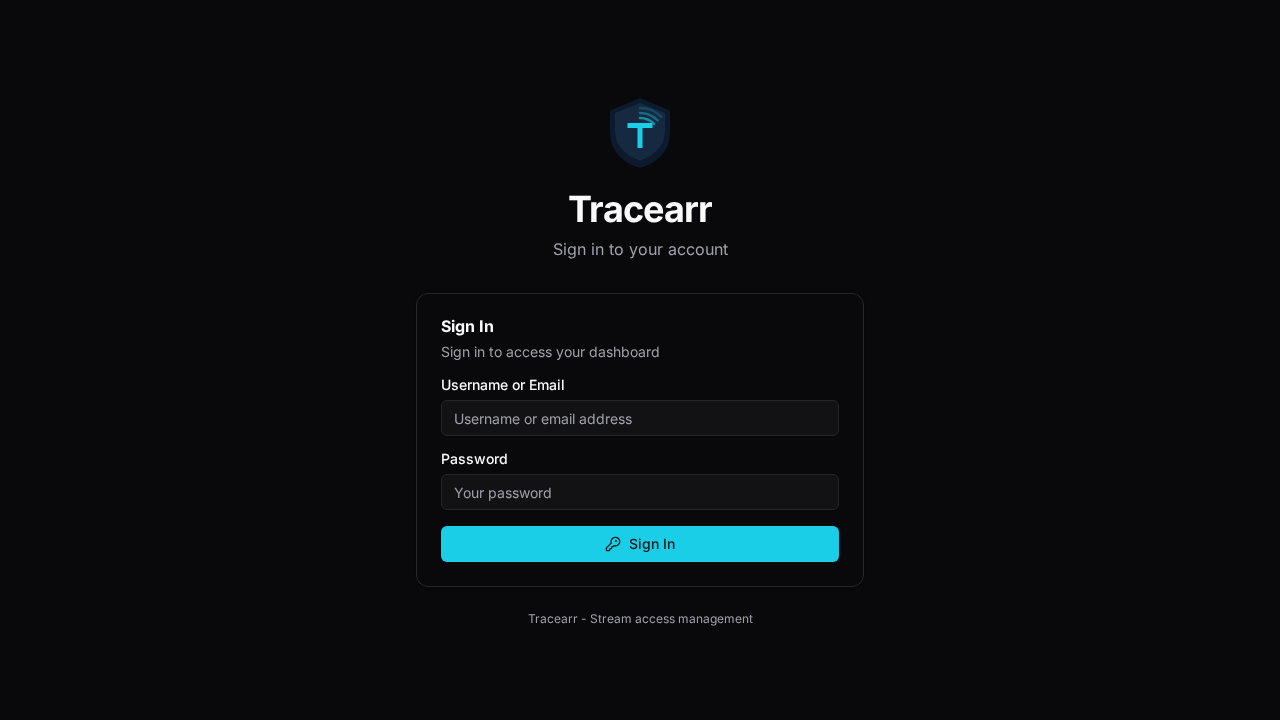
Navigate to http://localhost:3000/. When unauthenticated, the application routes to the /login screen:
Enter your administrative credentials (admin / password) into the login form:
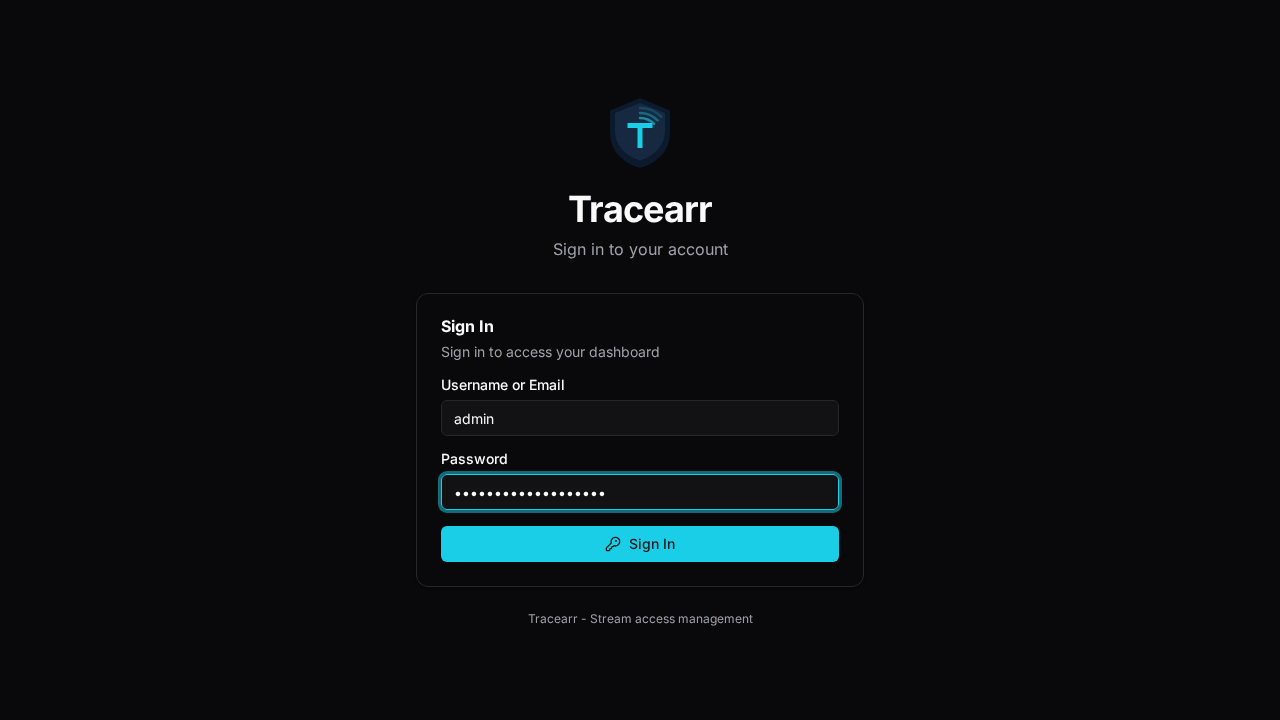
Click Sign In to access the dashboard.
Step 2: Connect Your Media Server
To begin collecting playback telemetry, link your Plex, Jellyfin, or Emby instance:
- In the left navigation menu, navigate to Settings -> Media Servers.
- Click Add Media Server.
- Select your server platform:
- Jellyfin / Emby: Enter the server name, the internal network URL (e.g. http://192.168.1.100:8096 or http://jellyfin:8096), and an API key generated from Jellyfin Dashboard -> Administration -> API Keys. - Plex: Enter your server name, URL (e.g. http://192.168.1.100:32400), and your Plex X-Plex-Token (or authenticate via OAuth).
- Save the server configuration. Tracearr immediately initiates a handshake, verifies server reachability, and synchronizes authorized server users.
[!TIP]
For Jellyfin and Emby servers, installing the Tracearr SSE Plugin enables sub-second server event push streaming and live hardware CPU/memory metrics.
Step 3: Inspect the Main Dashboard
Upon connecting a media server, the primary dashboard at / renders real-time telemetry:
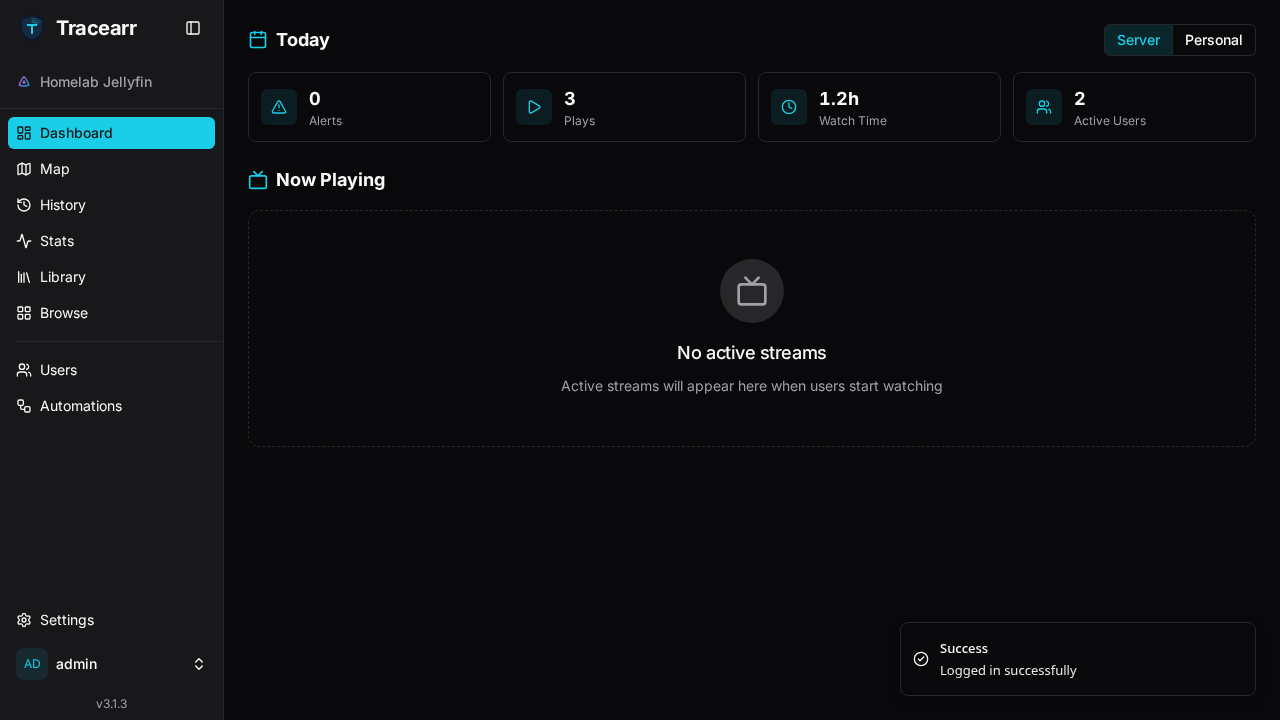
The dashboard provides an immediate overview of server operations:
- Today's Metric Tiles: Tracks active security alerts, total play count, cumulative watch duration, and unique active users for the current day.
- Now Playing: Displays live stream cards showing active media playback, viewer username, player platform, transcode status, and network bandwidth in real time.
Step 4: Audit Global Playback History
Click History in the sidebar navigation to open the unified playback ledger:
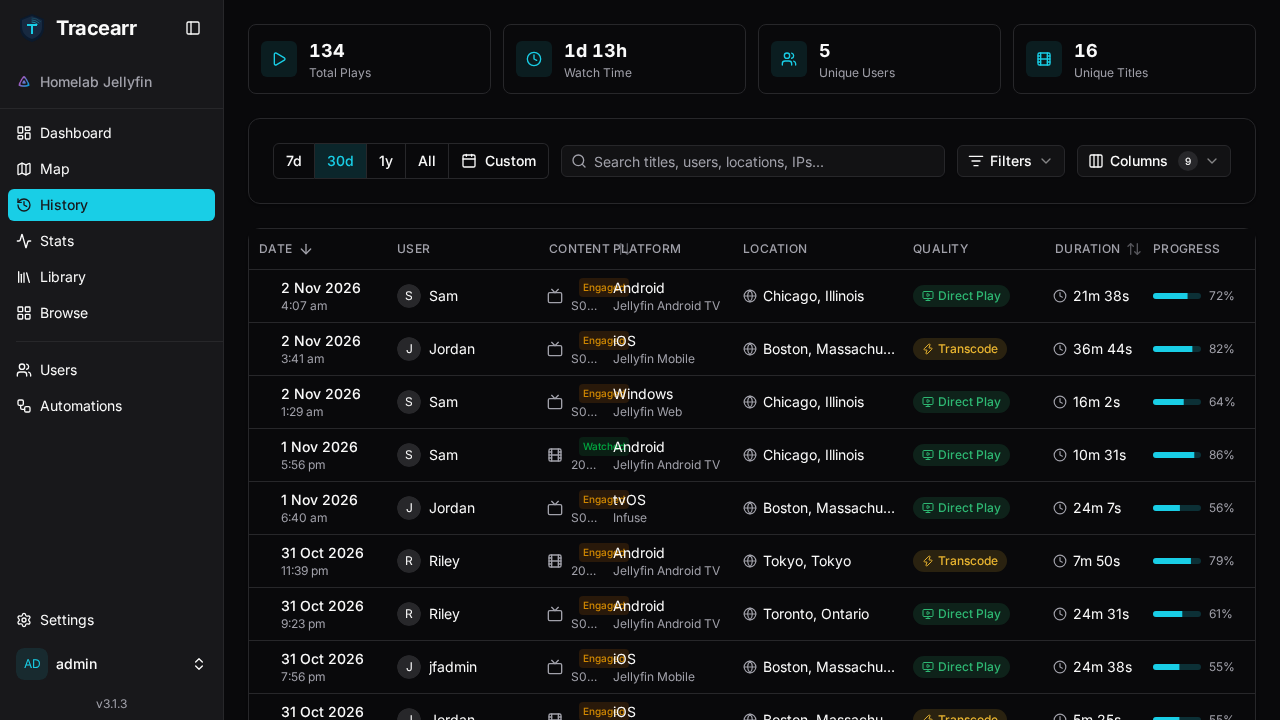
The History view provides comprehensive audit trails across all connected servers:
- Session Details: Records playback start time, user identity, media title, TV show season and episode numbering, and stream duration.
- Client & Hardware Diagnostics: Identifies the client device (e.g. *Living Room TV*, *Apple TV*, *iPhone*, *Shield*), player app, client IP address, and geographic city.
- Transcode Decisions: Badges streams as direct play or transcode, allowing server owners to pinpoint clients triggering heavy CPU/GPU conversion.
Use the integrated search filter to instantly find specific titles or users:
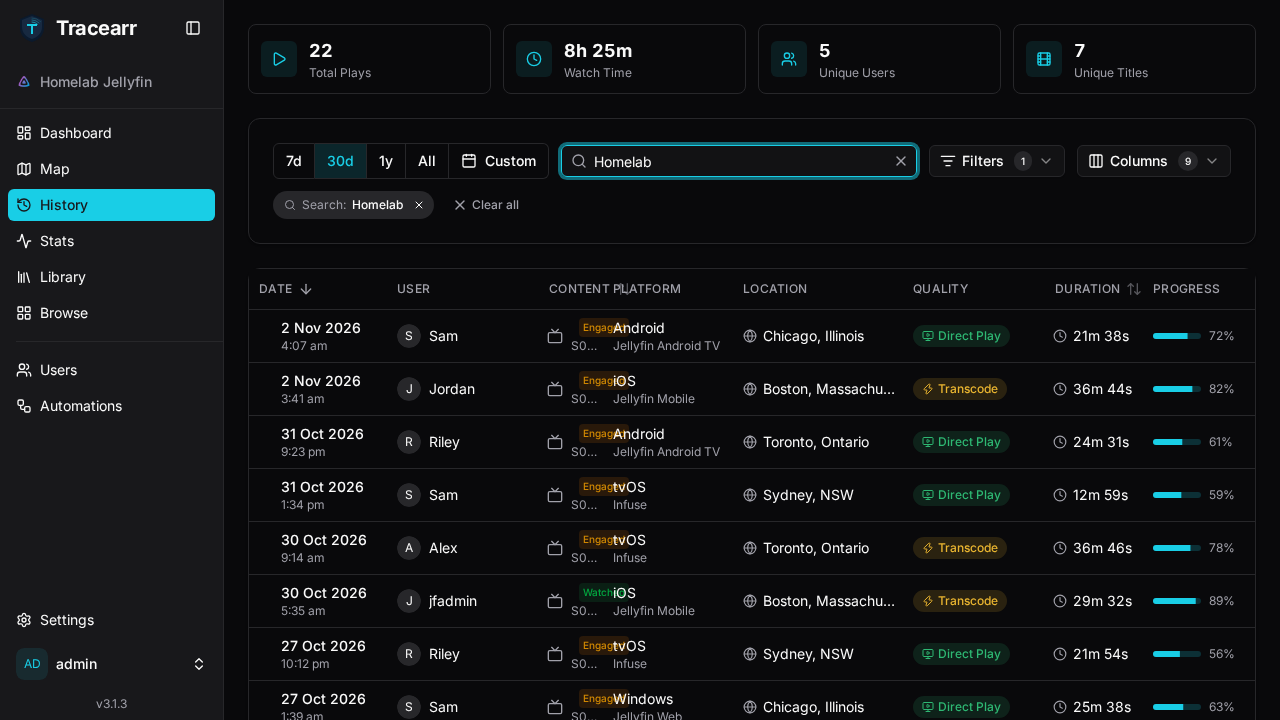
Step 5: Analyze Playback Activity Trends
Click Stats -> Activity in the sidebar to review detailed graphical analytics:
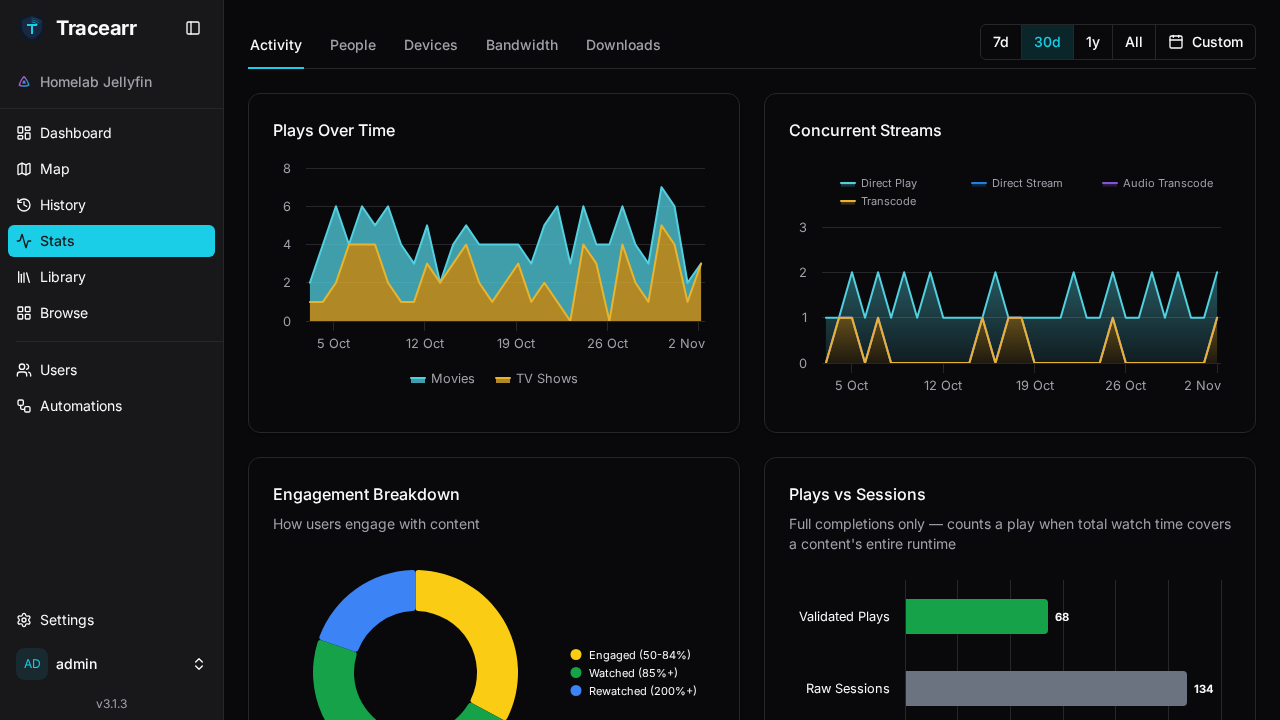
The Activity page renders high-resolution visualizations:
- Plays Over Time: Stacks daily playback trends comparing movie sessions against TV episode plays.
- Concurrent Streams: Plots peak simultaneous streams throughout each 24-hour cycle.
Scrolling down reveals in-depth viewing behavior:
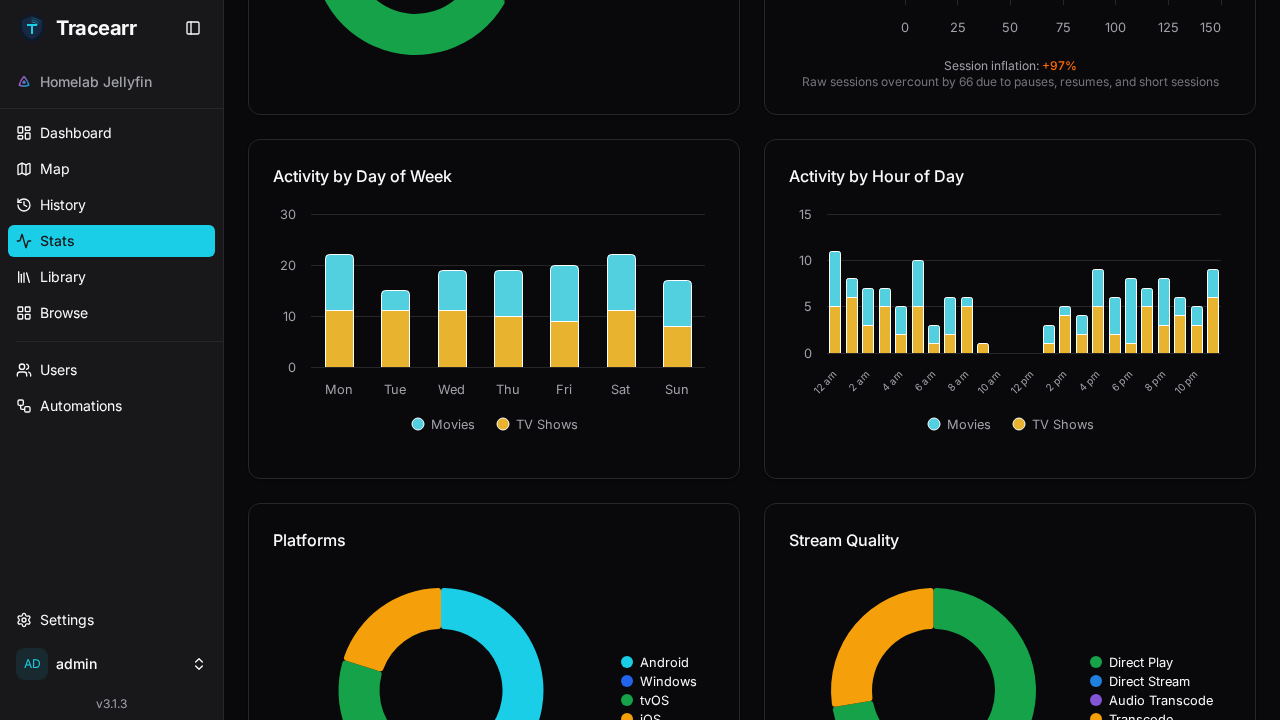
- Engagement Breakdown: Analyzes completion rates, average watch percentages, and pause durations.
- Plays vs. Sessions: Differentiates raw stream connects from validated long-form playback sessions.
Step 6: Manage Users and Trust Scoring
Click Users in the sidebar navigation to audit all synchronized accounts:
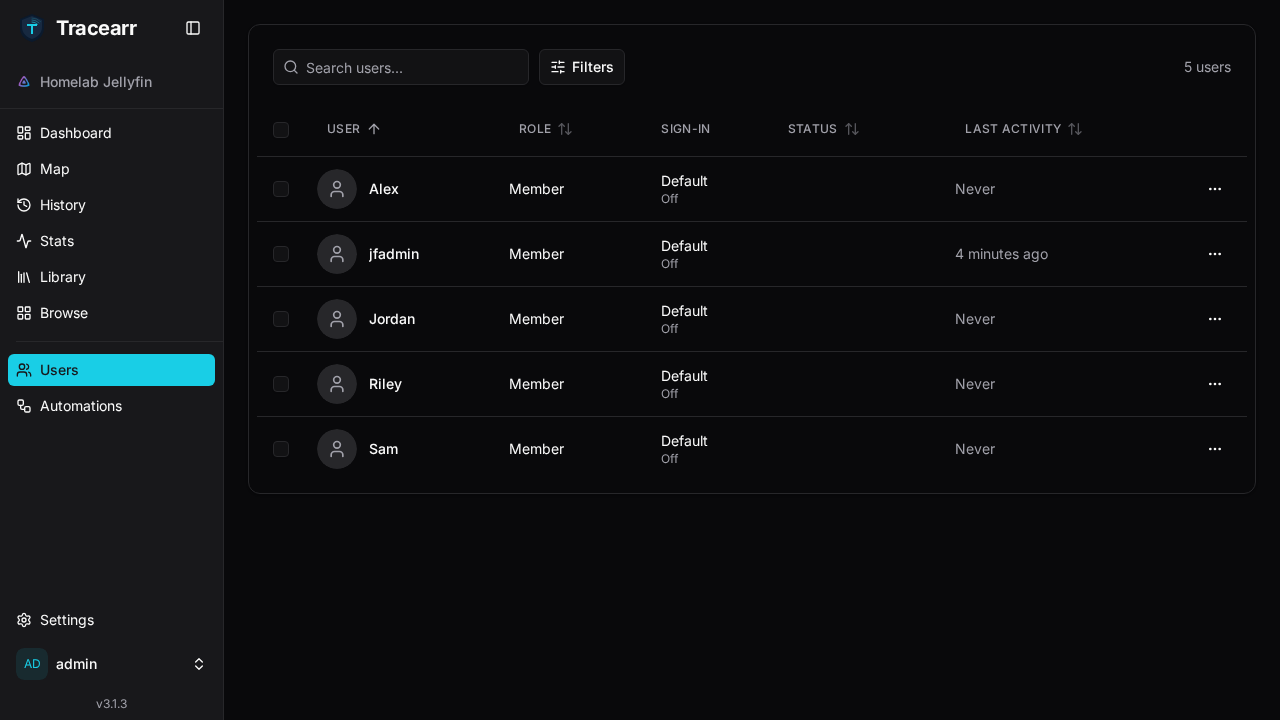
Tracearr links disparate media server accounts to consolidated individual identities:
- Session Counts: Tracks total playback sessions per user.
- Dynamic Trust Score: Displays each account's trust rating (starting at 100). If a user shares their credentials or triggers simultaneous streams from impossible geographical locations, their trust score automatically degrades.
Step 7: Configure Rules and Automations
Click Automations in the sidebar navigation to review and create reactive rules:
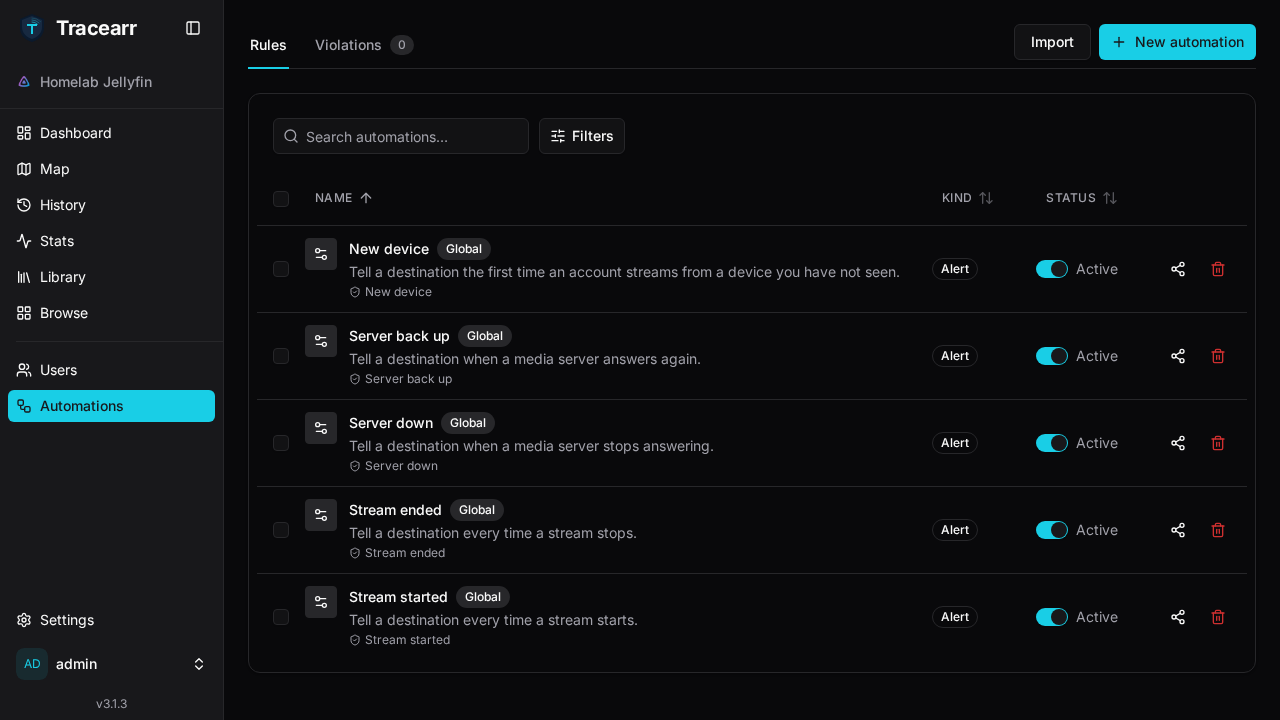
Tracearr includes pre-configured automation rules covering common security and operational workflows:
- New Device Alert: Dispatches an immediate notification when a user logs in from an unrecognized device profile.
- Server State Monitors: Alerts administrators when a media server drops offline or recovers.
- Stream Concurrency & Travel Violations: Enforces policies restricting simultaneous streams from distant IP locations, automatically docking user trust scores or terminating unauthorized sessions.
Step 8: Visualize Playback on the Vector Stream Map
Click Map in the sidebar navigation for the primary visual payoff:
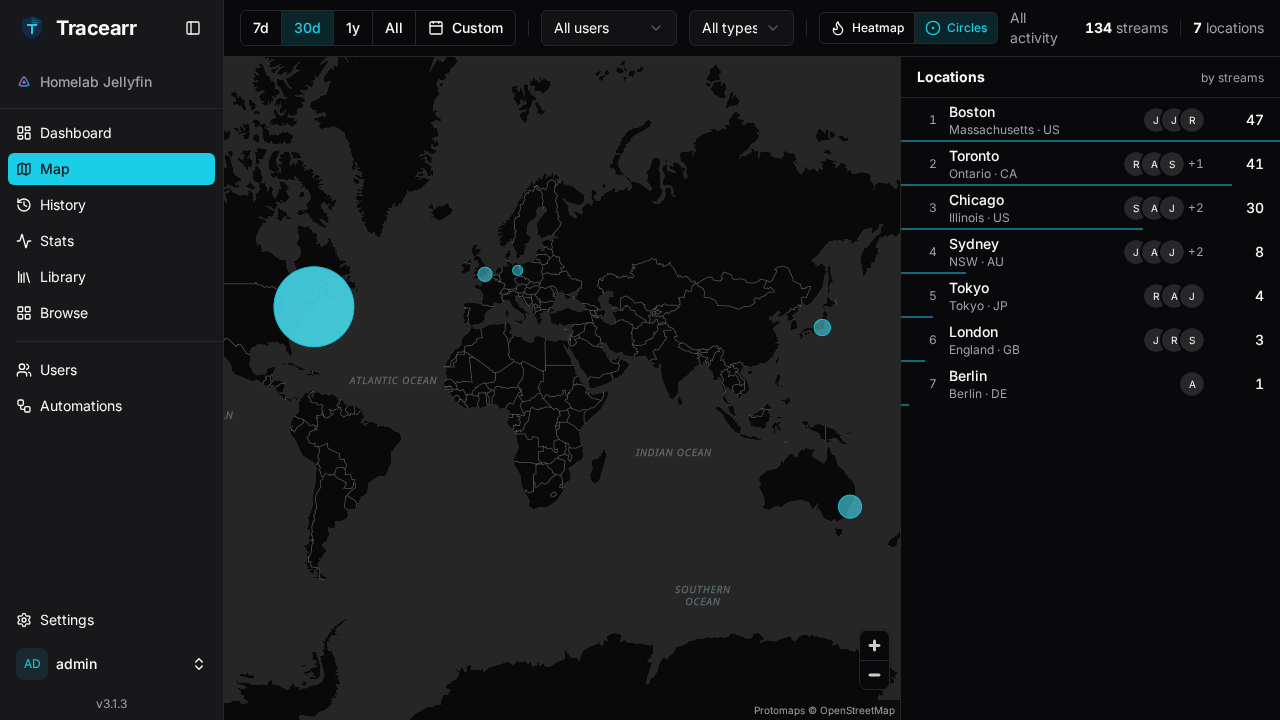
The Stream Map plots geographic playback distribution on an offline vector world map:
- Timeframe Selector: Toggle between 24-hour, 7-day, and 30-day aggregation windows.
- Display Modes: Choose between Circles view (discrete city clusters) or Heatmap view.
- Locations Ranking Panel: Displays a ranked leaderboard of viewer locations (e.g. *Boston: 47*, *Toronto: 41*, *Chicago: 30*, *Sydney: 8*, *Tokyo: 4*, *London: 3*, *Berlin: 1*), with interactive hovering highlighting geographic clusters directly on the map.
---
Verification
To verify that Tracearr is functioning correctly outside the web browser, execute the following operational checks.
1. Inspect Container Health and Process Status
Verify that all three Docker containers are running and healthy:
docker compose psEnsure the TimescaleDB hypertable is active and healthy:
docker exec -i tracearr-db psql -U tracearr -d tracearr -c "
  SELECT hypertable_name, num_chunks
  FROM timescaledb_information.hypertables
  WHERE hypertable_name = 'sessions';
"
Expected output confirms the sessions hypertable is registered with active storage chunks:
 hypertable_name | num_chunks
-----------------+------------
 sessions        |          1
(1 row)
2. HTTP Health Endpoint Verification
Probe the application health endpoint:
curl -s http://localhost:3000/health | jq .Expected output:
{
  "status": "ok",
  "version": "v3.1.3",
  "mode": "ready",
  "db": true,
  "redis": true,
  "geoip": true,
  "aggregates": 3
}
Key verification indicators:
db: true: Fastify has established an active connection pool to TimescaleDB.redis: true: BullMQ queue worker and Redis cache are connected.geoip: true: Embedded MaxMind GeoLite2 databases are loaded in memory.aggregates: 3: Continuous aggregate rollups are active in TimescaleDB.
3. Verify Setup Status
Check whether the initial setup and owner account creation are complete:
curl -s http://localhost:3000/api/v1/setup/status | jq .Expected output:
{
  "needsSetup": false,
  "hasOwner": true,
  "hasServers": true
}
4. Authenticate via User Credentials
Verify that password authentication succeeds against the Better Auth sign-in endpoint:
curl -s -H 'Content-Type: application/json' -H 'Origin: http://localhost:3000' \
  -X POST http://localhost:3000/api/v1/auth/sign-in/username \
  -d '{"username":"admin","password":"YourSecurePasswordHere!"}' | jq .
Expected response returns HTTP 200 with the authenticated user profile.
5. Operator CLI via Public REST API
Tracearr provides a key-authenticated public REST API under /api/v1/public using trr_pub_ bearer tokens.
To generate or retrieve your public API token, navigate to Settings -> API Key in the web interface (or call POST /api/v1/settings/api-key/regenerate with an authenticated owner session).
export API_KEY="trr_pub_YOUR_TOKEN_HERE"Query Connected Media Server Health
curl -sf -H "Authorization: Bearer $API_KEY" http://localhost:3000/api/v1/public/health | jq .Expected output:
{
  "status": "ok",
  "version": "v3.1.3",
  "servers": [
    {
      "id": "436b985a-16c5-4df2-bc04-3ac0cdbf7aa3",
      "name": "Homelab Media Server",
      "type": "jellyfin",
      "online": true,
      "activeStreams": 0
    }
  ]
}
Query Aggregate System Statistics
curl -sf -H "Authorization: Bearer $API_KEY" http://localhost:3000/api/v1/public/stats | jq .Expected output:
{
  "activeStreams": 0,
  "totalUsers": 5,
  "totalSessions": 134,
  "recentViolations": 0
}
Query Recent Stream History
curl -sf -H "Authorization: Bearer $API_KEY" "http://localhost:3000/api/v1/public/history?pageSize=5" | jq -r '
  "Total plays: " + (.meta.total | tostring),
  (.data[] | "  \(.user.username) | \((.showTitle // "") + " " + .mediaTitle) | \(.player) | \(.videoDecision)")
'
Expected output:
Total plays: 134
  Sam | Homelab Nights Episode 2 | Living Room TV | directplay
  Jordan | Homelab Nights Episode 3 | iPhone | transcode
  Sam | Pixel Kitchen Episode 7 | Chrome | directplay
  Sam | Tears of Steel | Shield | directplay
  Jordan | The Open Movie Hour Episode 3 | Infuse | directplay
Query Synchronized User Accounts & Trust Ratings
curl -sf -H "Authorization: Bearer $API_KEY" http://localhost:3000/api/v1/public/users | jq -r '
  .data[] | "  \(.username) | plays: \(.sessionCount) | trust: \(.trustScore)"
'
Expected output:
  Sam | plays: 27 | trust: 100
  Jordan | plays: 30 | trust: 100
  Riley | plays: 28 | trust: 100
  Alex | plays: 23 | trust: 100
---
Troubleshooting
| Symptom / Error | Root Cause | Remediation Step |
|---|---|---|
Application fails to start with Error: JWT_SECRET or COOKIE_SECRET missing | Fastify and Better Auth require 32-byte cryptographic secret tokens for session and cookie signing. | Generate fresh secrets using openssl rand -hex 32 and populate both JWT_SECRET and COOKIE_SECRET inside .env. Recreate containers with docker compose up -d. |
API call returns 400 Bad Request with body must be object on empty POST | Fastify rejects empty request bodies sent with Content-Type: application/json. | When calling endpoints like POST /api/v1/settings/api-key/regenerate or POST /api/v1/servers/:id/sync, pass an explicit empty JSON body using -d '{}'. |
Container fails to start with bind: address already in use on port 3000 | Host port 3000 is currently bound by another service or existing container. | Change PORT=3002 (or another free host port) in .env, then recreate the stack using docker compose up -d. |
| TimescaleDB container crashes or reports shared memory errors in logs | TimescaleDB HA requires sufficient shared memory (shm_size) for parallel workers and hypertable aggregation. | Ensure shm_size: 512mb and ulimits nofile: { soft: 65536, hard: 65536 } are configured for the timescale service in compose.yml. |
Media server connection test fails with ECONNREFUSED or timeout | Tracearr is attempting to reach the media server at localhost or an unreachable internal IP from inside the container network. | Use your Docker host's LAN IP (e.g. http://192.168.1.50:8096 or http://192.168.1.50:32400), or attach the media server container to the same Docker bridge network (tracearr) and use the container service name (e.g. http://jellyfin:8096). |
| Stream Map renders a blank world map without city pins | Client sessions are connecting from private RFC 1918 LAN IP addresses (e.g. 192.168.x.x, 10.x.x.x), or a reverse proxy is stripping X-Forwarded-For headers. | Ensure your reverse proxy passes real client IPs via X-Forwarded-For and X-Real-IP. For local network playback, configure server location overrides under Media Server Settings so local plays map to your home coordinates. |
/api/v1/setup/status displays hasPasswordAuth: false after initial sign-up | Cosmetic status flag quirk: Better Auth writes accounts to its own identity tables rather than the legacy users.password_hash column. | Normal behavior. Password authentication via POST /api/v1/auth/sign-in/username and the web login form functions correctly with HTTP 200. |
| Continuous aggregates or analytics charts are out of date | TimescaleDB continuous aggregates refresh on scheduled background cron intervals. | Manually trigger a refresh across continuous aggregates using docker exec -i tracearr-db psql -U tracearr -d tracearr -c "CALL refresh_continuous_aggregate('view_name', NULL, NULL);" or wait for the background worker to execute. |
---
Assumptions & Decisions
- Container Stack Architecture: Documented the primary production 3-container stack (
tracearr,timescale, andredis) based on upstreamdocker/examples/docker-compose.pg18.yml. PostgreSQL 18 with TimescaleDB HA was chosen over standard PostgreSQL due to Tracearr's architectural dependency on time-series hypertables and continuous aggregate rollups for stream telemetry. - Strict Cryptographic Secrets Requirement: Highlighted
JWT_SECRETandCOOKIE_SECRETgeneration in.env. Tracearr immediately aborts container boot if either key is missing or shorter than 32 bytes. - Media Server Companion Context: In production homelabs, administrators connect existing external Plex, Jellyfin, or Emby instances via LAN IP addresses or container DNS. The lab test validated connectivity using a companion Jellyfin container on port 8096, demonstrating automated API key pairing and user synchronization.
- Synthetic Playback Data Context: Because the test lab environment operated without live streaming devices, 134 synthetic playback sessions across 7 global cities were seeded into the
sessionshypertable to validate analytical graphs and the vector stream map. The documentation clarifies that live production environments populate these records automatically via media server webhooks and SSE telemetry. - Payoff Screen Selection: Selected the Stream Map (
final.png/10-payoff-map.png) in 30-day Circles view as the opening payoff image. Unlike the dashboard's "Now Playing" section (which only displays active real-time streams), the Stream Map showcases the full breadth of Tracearr's unique geolocation capabilities, offline vector mapping, and multi-location analytics. - Operator REST API CLI: Documented the key-authenticated
/api/v1/publicendpoint usingtrr_pub_bearer tokens as the standard programmatic CLI interface, providing verifiedcurlrecipes for server health, analytics, playback history, and user audits. - Ghost HTML Compatibility: Structured all troubleshooting matrices as GitHub-flavored Markdown tables to ensure clean compilation into Ghost HTML cards via the
ghost-draftrendering pipeline.
Get the Unified Homelab Stack Compose Pack
One-command multi-container Compose files (Full *arr Stack, Prometheus + Grafana + ntfy Monitoring, and Homelab Auth) plus new verified deploys once a week.