
How to Deploy Tautulli: Plex Monitoring, Analytics, and Notifications with Docker Compose
Tautulli is an open-source observability and analytics platform for Plex Media Server that tracks stream activity, decodes transcode bottlenecks, and sends real-time alerts. Learn how to deploy Tautulli using Docker Compose, navigate the analytics dashboard, and manage configurations with the REST API.
Tautulli (originally developed as PlexPy) is an open-source, full-featured Python web application dedicated to monitoring, analytics, alerting, and reporting for Plex Media Server, licensed under the GNU General Public License v3.0 (GPL-3.0). While Plex provides basic in-app playback views, administrators who share their media collections with family, friends, or homelab users often struggle with blind spots: which users are actively streaming, whether streams are direct playing or overwhelming the server CPU with software transcodes, which media items are most popular, and when bandwidth limits are saturated.
Tautulli acts as an external observability sidecar that interfaces directly with Plex Media Server via WebSocket event streams and REST APIs. It continuously logs playback events into an embedded SQLite3 database with WAL journaling, providing detailed stream statistics, historical analytics via interactive Highcharts graphs, dynamic DataTables search and filtering, and multi-channel alerting.
Core Capabilities and Architecture
- Real-Time Stream Telemetry & Transcode Auditing: Inspects active playback sessions in real time, capturing playback progress, player device profiles (Apple TV, Android TV, iOS, Plex Web), container formats, and audio/video codecs. Crucially, it identifies whether media is Direct Playing, Direct Streaming, or Transcoding, including reasons for transcode decisions and hardware acceleration status (Intel QuickSync, NVIDIA NVENC).
- Historical Analytics & Aggregated Visualizations: Stores session history across all users and media libraries. Interactive Highcharts graphs present daily and hourly play counts, bandwidth consumption, top users, and most watched movies and TV series over configurable time ranges (e.g. 7, 14, or 30 days).
- Multi-Channel Alert Dispatcher: Features an APScheduler-driven notification engine supporting webhooks, Discord rich embeds, Telegram, Slack, Pushbullet, Pushover, MQTT, email, and custom shell/Python scripts. Triggers include playback start, stop, pause, resume, buffer warnings, newly added library items, and Plex server availability state changes.
- Automated User Newsletters: Aggregates recently added movies, TV episodes, and music albums into custom-styled HTML newsletters delivered automatically to Plex users on a recurring schedule.
- Standalone CherryPy Web Architecture: Powered by Python 3.11+, CherryPy, and the Cheroot WSGI server with Mako server-side templating. Tautulli operates completely standalone without requiring an external database server or web proxy.
- Programmatic REST API v2 & Mobile App Ecosystem: Exposes a full JSON REST API (
/api/v2) secured with API keys, enabling automated pipeline configuration and integration with native iOS and Android companion apps via Firebase Cloud Messaging.
---
Prerequisites
Before deploying Tautulli, verify that your host system satisfies the following technical requirements:
- Operating System: Linux (Ubuntu 22.04+, Debian 12+, Rocky Linux, Fedora, Arch Linux), macOS, or Windows via WSL2.
- Container Runtime: Docker Engine 20.10+ with Docker Compose v2 (
docker compose versionv2.20+ recommended). - Hardware Resources:
- CPU: 1 vCPU core minimum (Tautulli is lightweight and only processes telemetry metadata; it does not transcode video). - Memory: 512 MB to 1 GB RAM (typical runtime footprint is ~150 MB). - Storage: 1 GB free disk space for the container image (ghcr.io/tautulli/tautulli:latest) and SQLite database storage.
- Network Ports: An available host port (this guide uses port
3000, mapped to internal container port8181). - User Permissions: Non-root User ID (
PUID) and Group ID (PGID) matching your host user (id -u/id -g, typically1000:1000) for correct volume permissions. - Plex Media Server: An accessible Plex Media Server instance on your local network, container network, or accessible via Plex.tv account credentials.
---
Exact Install Steps
The deployment uses Docker Compose to run the official multi-architecture container image ghcr.io/tautulli/tautulli:latest with a persistent configuration bind mount.
Step 1: Create Deployment Directory Structure
Create a dedicated directory for your Tautulli stack and the persistent configuration folder:
mkdir -p tautulli/config
cd tautulli
Step 2: Configure Environment Variables (.env)
Create a .env file to define the project name, exposed port, user permissions, and timezone:
cat << 'EOF' > .env
COMPOSE_PROJECT_NAME=tautulli
TAUTULLI_PORT=3000
PUID=1000
PGID=1000
TZ=UTC
EOF
Key environment parameters:
COMPOSE_PROJECT_NAME: Scopes container, network, and volume names to avoid conflicts.TAUTULLI_PORT: The host port exposed to your browser and API clients (default is8181; port3000is used here).PUIDandPGID: Maps the internaltautulliprocess user to your host user, preventing file ownership permission issues in./config.TZ: Configures the container timezone so watch history timestamps match your local clock.
Step 3: Create Docker Compose Specification (compose.yml)
Create compose.yml to define the Tautulli service:
cat << 'EOF' > compose.yml
services:
  tautulli:
    container_name: ${COMPOSE_PROJECT_NAME}-app
    image: ghcr.io/tautulli/tautulli:latest
    restart: unless-stopped
    environment:
      - PUID=${PUID:-1000}
      - PGID=${PGID:-1000}
      - TZ=${TZ:-UTC}
    ports:
      - "${TAUTULLI_PORT}:8181"
    volumes:
      - ./config:/config
    networks:
      - tautulli

networks:
  tautulli:
EOF
Key configuration details:
ghcr.io/tautulli/tautulli:latest: The official upstream container image maintained by the Tautulli team, running Python 3.13 and built-in healthchecks.- Port Mapping (
${TAUTULLI_PORT}:8181): Tautulli's internal web server listens on TCP port8181inside the container and binds to host port3000. - Persistent Bind Mount (
./config:/config): Stores theconfig.iniconfiguration file, SQLite database (tautulli.db), cache, and application logs directly on the host filesystem. Using a direct host directory bind mount prevents Docker named volume sentinel warnings (Docker /config volume not mounted) and allows straightforward backup and migration.
Step 4: First-Run Security and Admin Initialization
Tautulli supports two distinct onboarding paths:
- Interactive Setup Wizard (Standard Homelab Path): When launched without pre-existing configuration, visiting
http://localhost:3000/welcomeguides you through connecting your Plex.tv account via OAuth, auto-detecting your Plex Media Server, and setting up an administrator login. - Headless / Automated Homelab Pre-Configuration: For unattended server deployments or GitOps pipelines where interactive browser OAuth cannot run immediately, you can seed
config/config.inibefore starting the container.
To configure an initial administrator account and enable the REST API programmatically, generate a random API key and create config/config.ini:
export ADMIN_USER="admin"
export ADMIN_PASS="ShortformDemo-2026!"
export API_KEY=$(openssl rand -hex 16)

cat << EOF > config/config.ini
[General]
first_run_complete = 1
http_host = 0.0.0.0
http_port = 8181
http_username = ${ADMIN_USER}
http_password = ${ADMIN_PASS}
http_hash_password = 1
http_hashed_password = 0
api_enabled = 1
api_key = ${API_KEY}
check_github = 0
home_sections = current_activity, watch_stats, library_stats, recently_added

[Advanced]
system_analytics = 0

[PMS]
pms_name = Demo Plex Server
pms_identifier = shortform-demo-pms
EOF

chmod 600 config/config.ini
[!NOTE]
Settinghttp_hash_password = 1andhttp_hashed_password = 0instructs Tautulli to automatically hash the plaintext password using salted hashing on its very first startup, updatingconfig.iniin place so the plaintext password is never retained.
Step 5: Pull Images and Launch Services
Download the official container image and launch Tautulli in detached mode:
docker compose pull -q
docker compose up -d
Verify that the container is running:
docker compose psExpected output:
NAME           IMAGE                             COMMAND                  SERVICE    CREATED         STATUS                   PORTS
tautulli-app   ghcr.io/tautulli/tautulli:latest  "/init"                  tautulli   5 seconds ago   Up 4 seconds (healthy)   0.0.0.0:3000->8181/tcp
Step 6: Await Service Readiness
Probe the public /status endpoint until the application web server reports ready:
until [ "$(curl -s -o /dev/null -w '%{http_code}' http://localhost:3000/status)" = "200" ]; do
  echo "Waiting for Tautulli web server to initialize..."
  sleep 2
done
echo "Tautulli is ready at http://localhost:3000"
The web server typically initializes within 4 to 6 seconds.
---
Browser Setup and Workflow Walkthrough
Once the container is live, access the web interface to verify authentication, inspect analytics, and configure notification alerts.
Step 1: Access the Web Interface and Sign In
Open your web browser and navigate to http://localhost:3000/. When unauthenticated, Tautulli redirects to /auth/login?redirect_uri=/.
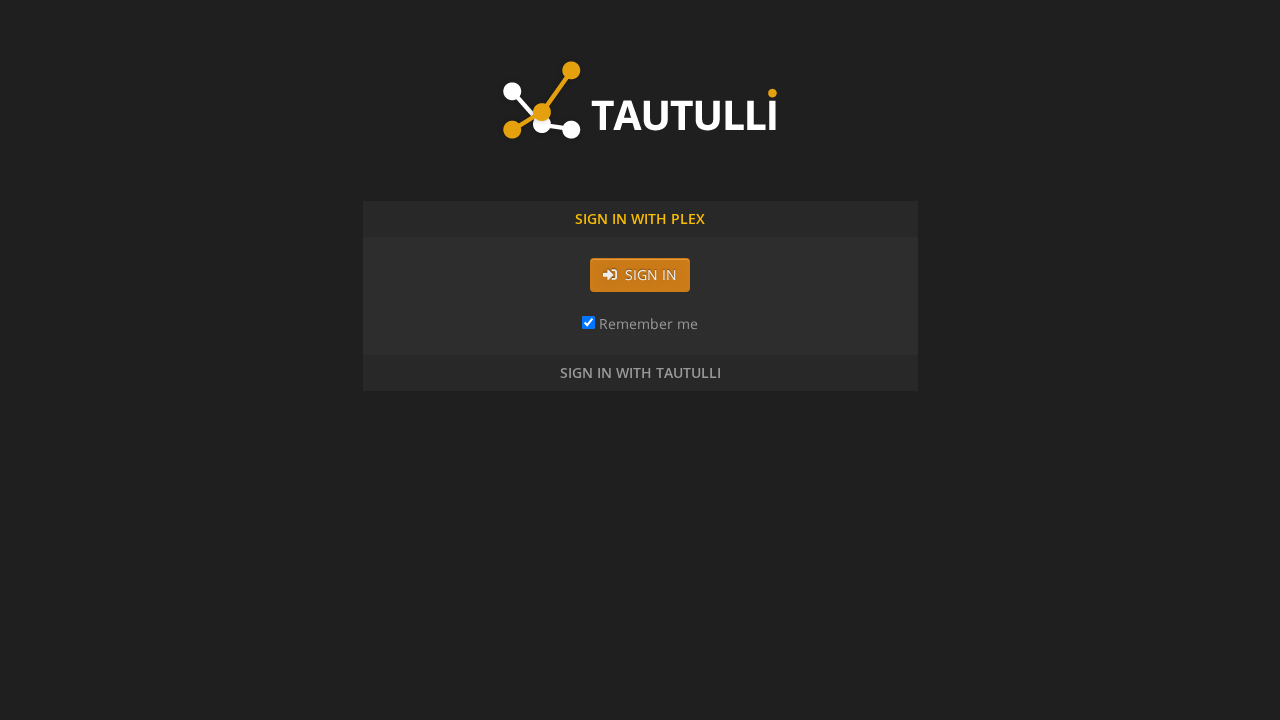
The login screen defaults to the Sign In with Plex accordion. To authenticate with your local administrator credentials:
- Click the Sign In with Tautulli accordion header.
- The username and password fields will expand into view.
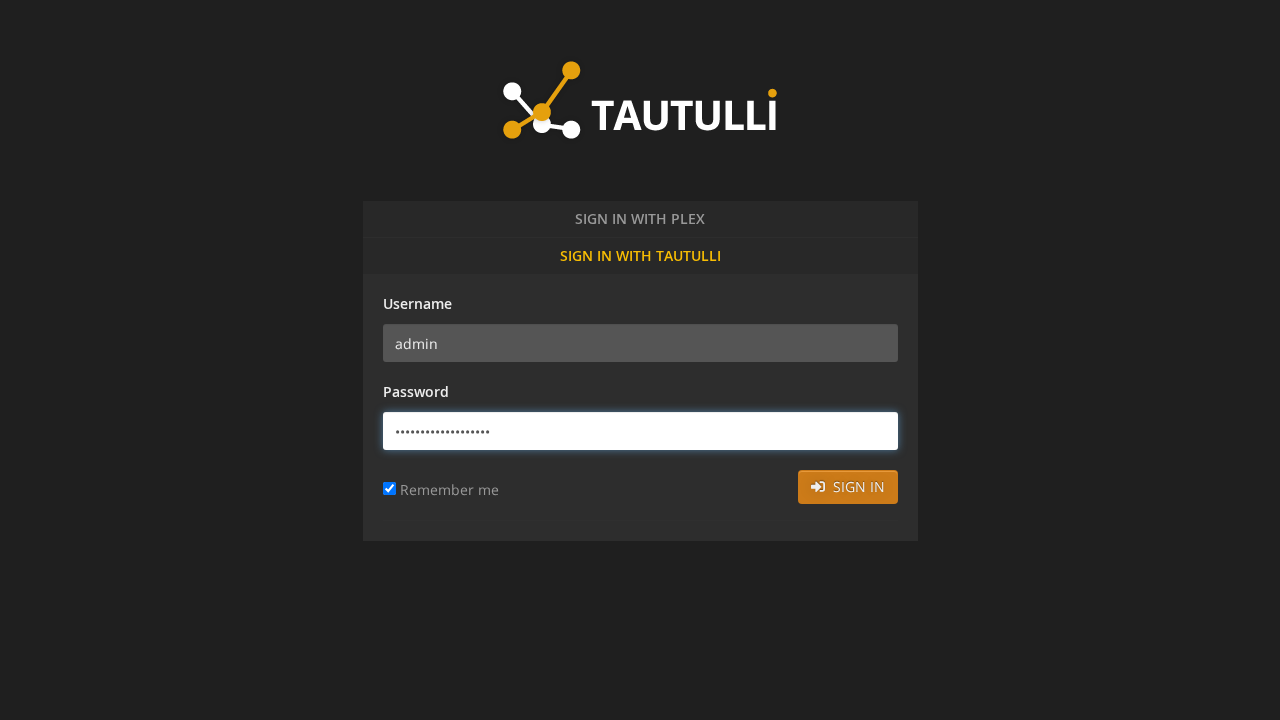
- Enter your username (
admin) and configured password (ShortformDemo-2026!). - Click Sign In.
If a one-time "Tautulli Updated" modal dialog appears upon first login, click Close to proceed to the main dashboard.
Step 2: Inspect the Home Dashboard & Watch Statistics
Upon authentication, Tautulli loads the primary dashboard at /home.
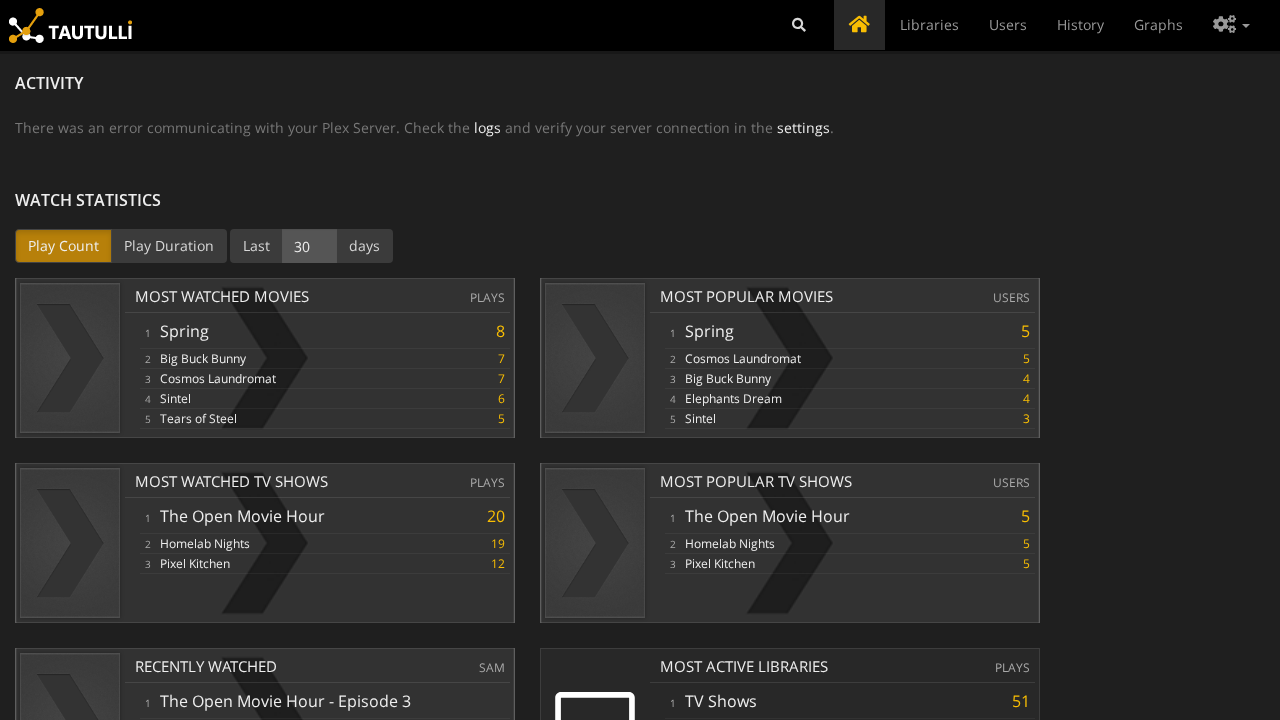
The dashboard organizes telemetry into modular cards:
- Current Activity: Shows active streams in real time. (When Plex Media Server is synchronizing or running initial discovery, Tautulli displays a connection notice while gracefully retrying background websocket connection in the background).
- Watch Statistics: Highlights media popularity trends, including Most Watched Movies (e.g. *Spring*, *Big Buck Bunny*), Most Watched TV Shows (*The Open Movie Hour*, *Homelab Nights*, *Pixel Kitchen*), and top active users.
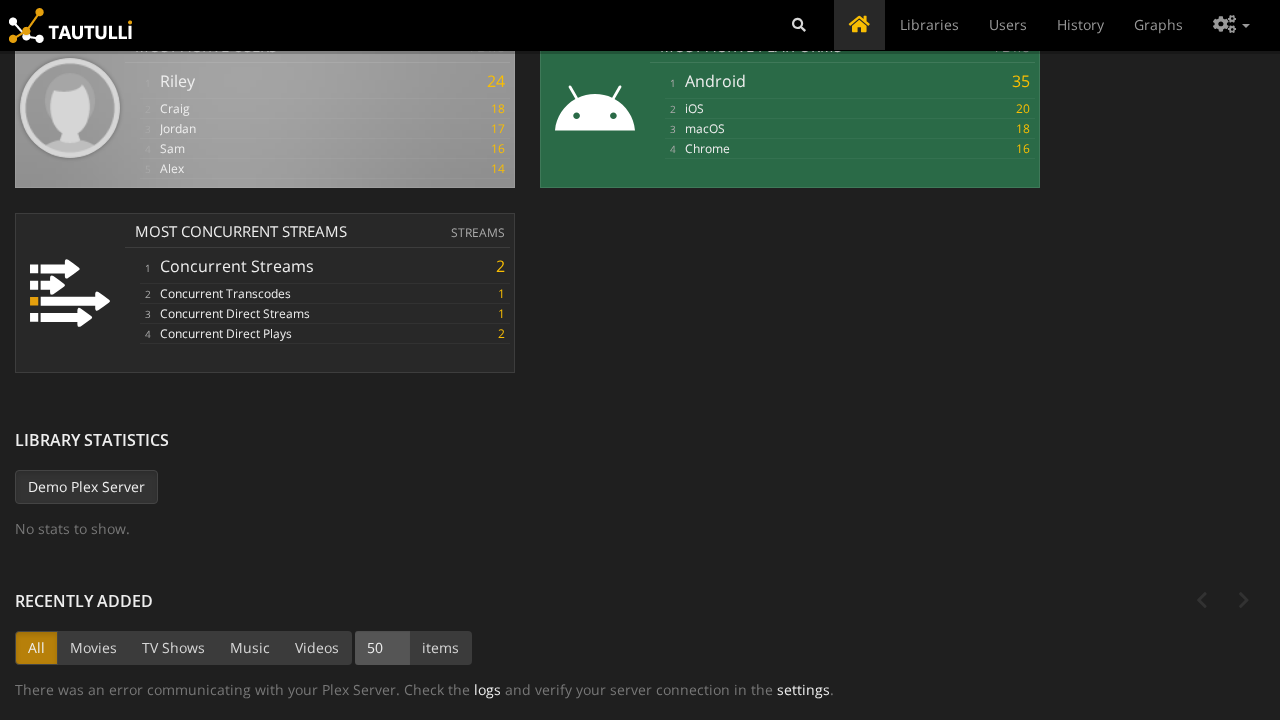
- Most Active Libraries: Displays total play counts and cumulative duration per library section across Movies, TV Shows, and Music.
Step 3: Explore Global Watch History and Stream Details
Click History in the top navigation bar to open the comprehensive playback ledger.
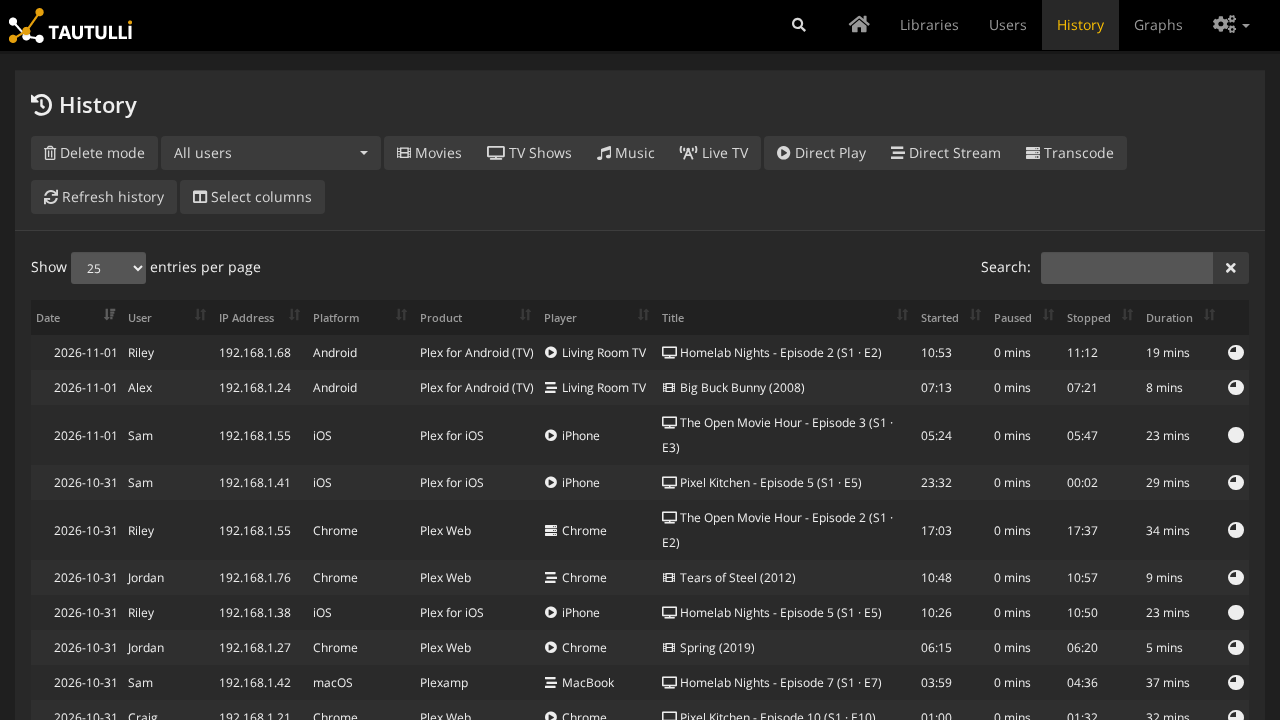
The History view uses an interactive DataTable that tracks every completed or ongoing media stream:
- Playback Metadata: Displays the date, time, user identity, media title, season/episode numbering, and duration.
- Player & Hardware Diagnostics: Lists the client device (e.g. *Living Room TV*, *Shield*, *iPhone*, *MacBook*), player app (*Plex for Android (TV)*, *Plex for iOS*, *Plexamp*, *Plex Web*), client IP address, and network location (
lanvswan). - Transcode Decision Badges: Clearly labels each stream as direct play, copy, or transcode, allowing server owners to immediately pinpoint clients that trigger CPU-intensive video conversions.
You can filter records instantly using the integrated search box:
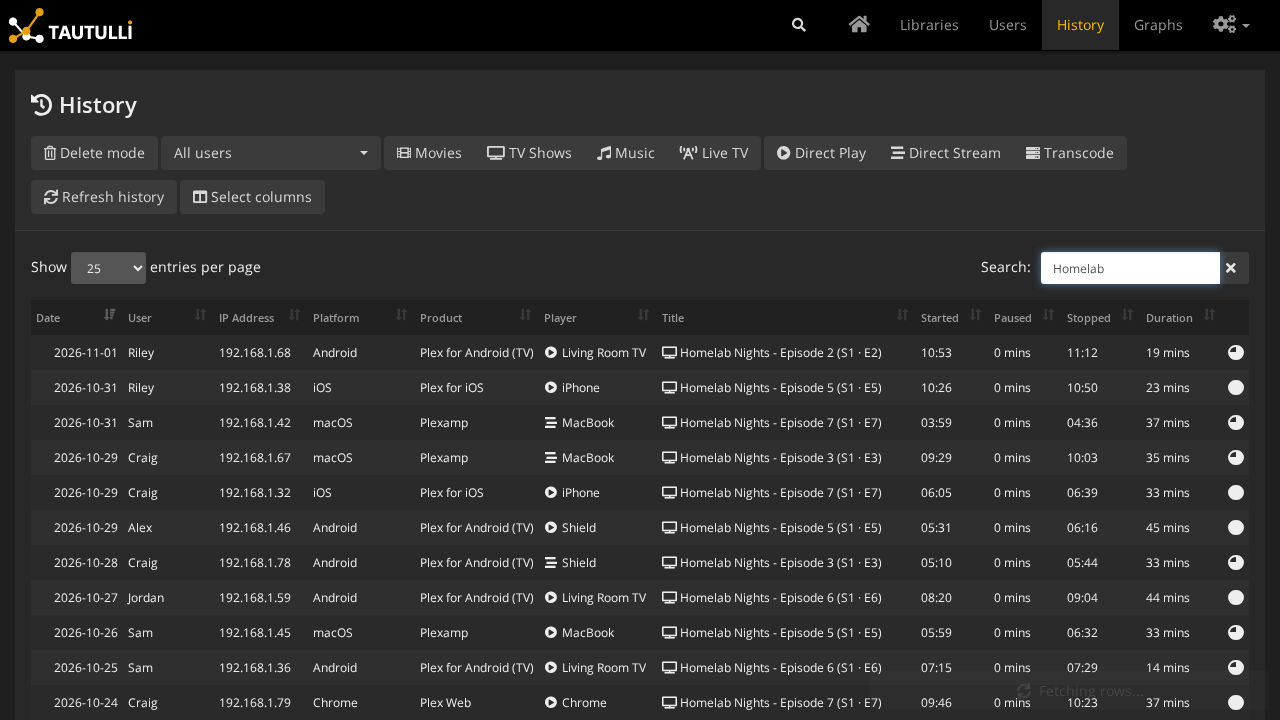
Typing a search string (such as "Homelab") filters the 89 total history records dynamically without requiring a page reload.
Step 4: Audit Users and Library Sections
Click Users in the top navigation menu to review all connected viewer accounts:
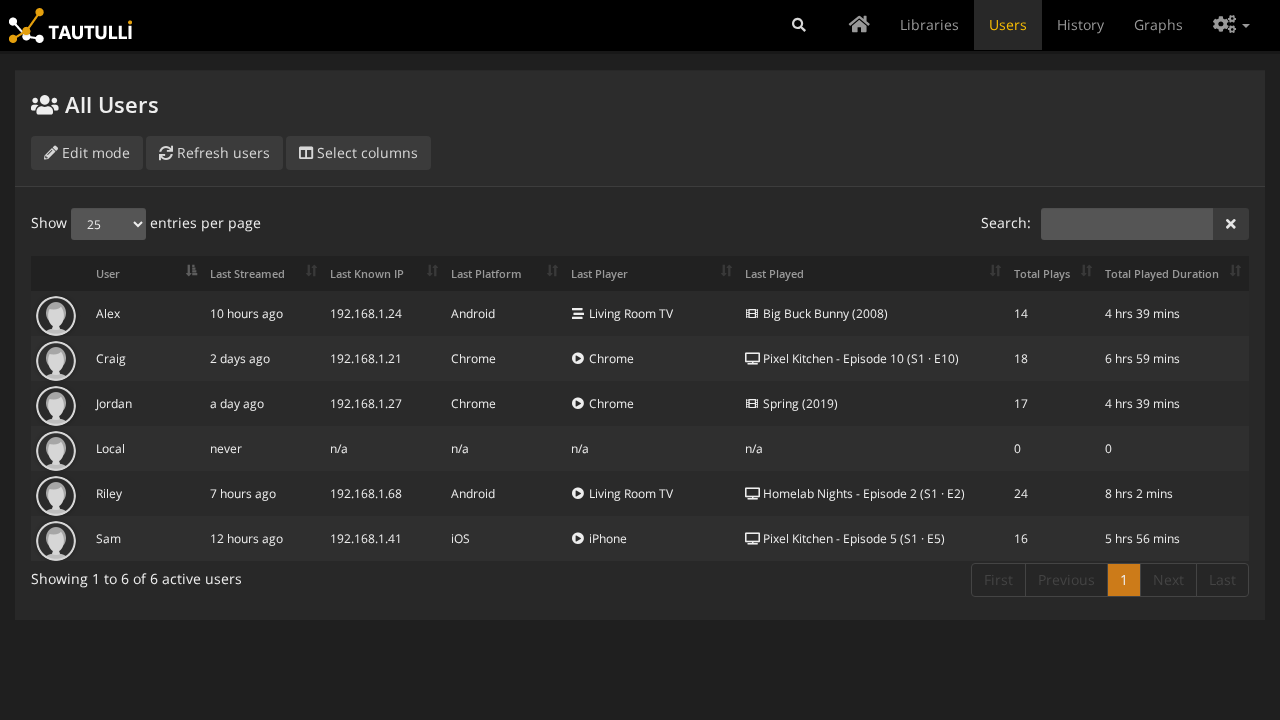
The Users table lists all authorized Plex users (e.g. *Craig*, *Alex*, *Sam*, *Jordan*, *Riley*), indicating their administrator status, active device profiles, total play count, and last seen timestamps. Clicking any user opens an individual profile detailing their personal watch habits and bandwidth usage.
Next, click Libraries in the top navigation menu:
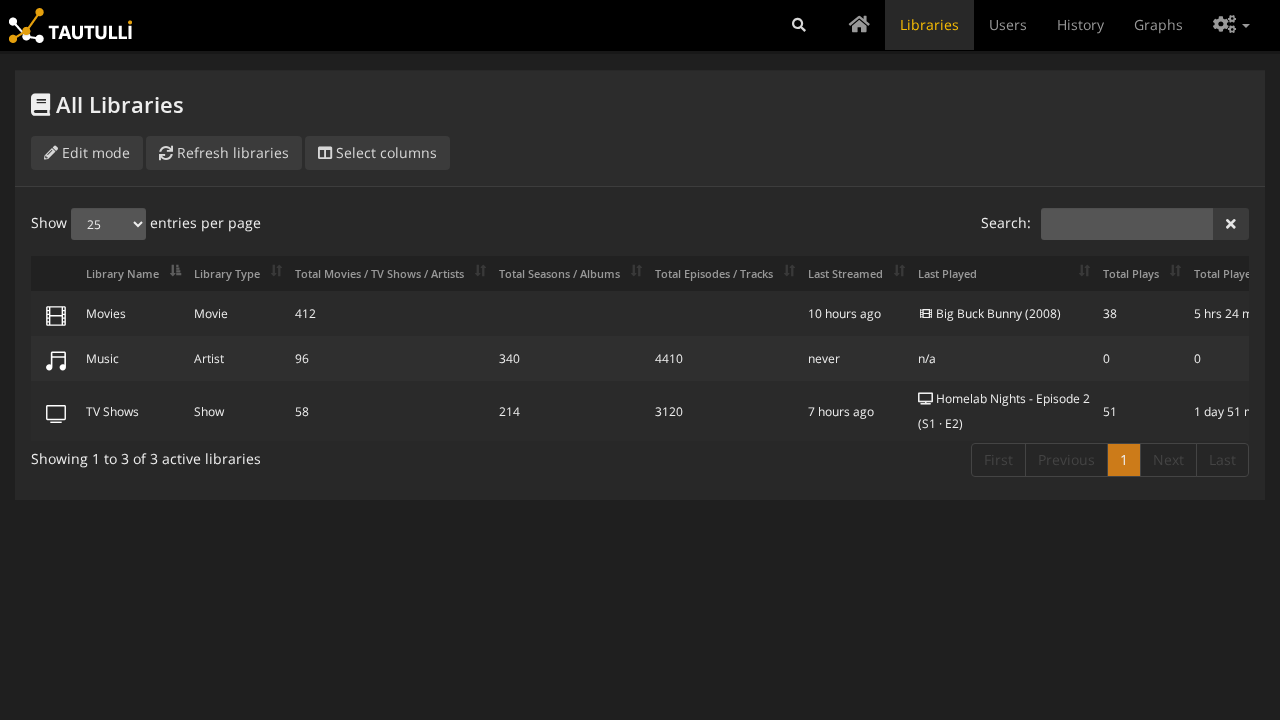
The Libraries table provides a breakdown of each monitored section:
- Movies: 412 items, 38 plays recorded.
- TV Shows: 58 shows, 214 seasons, 3,120 episodes, 51 plays recorded.
- Music: 96 artists, 340 albums, 4,410 tracks.
Step 5: Configure Notification Agents
Navigate to Settings (gear icon in the top right) and select Notification Agents from the sidebar:
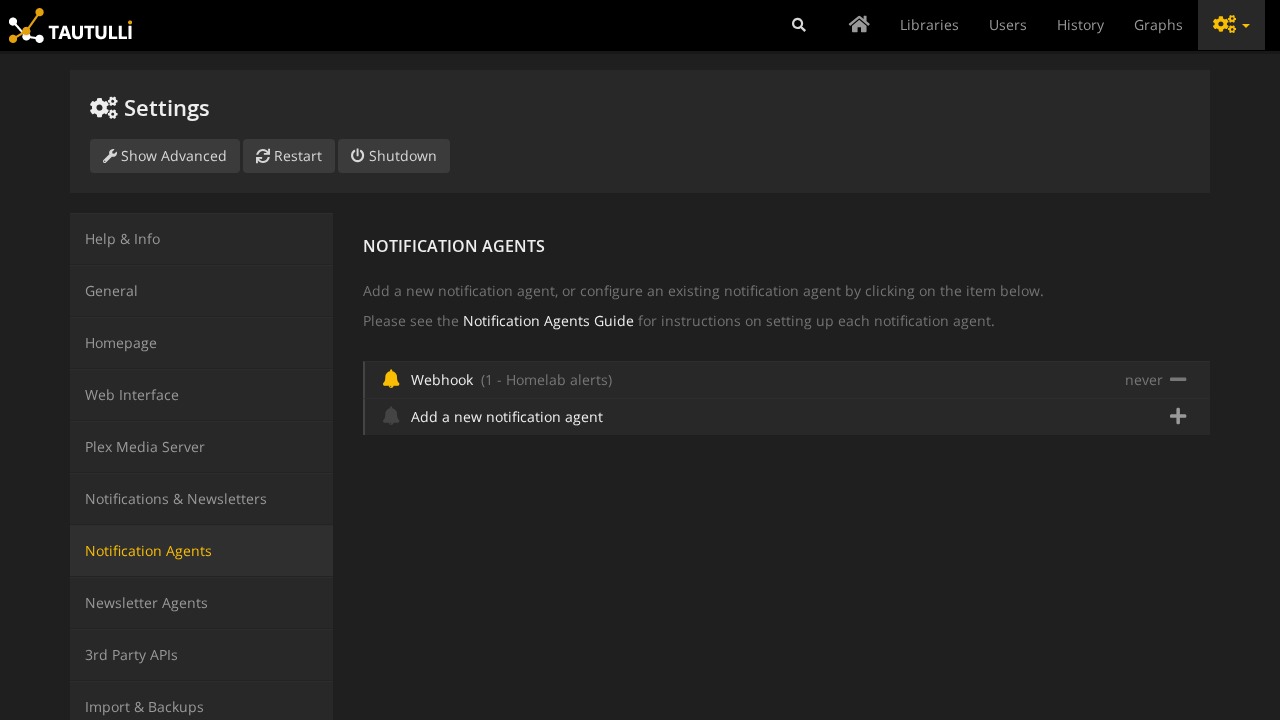
Tautulli supports over a dozen alerting integrations. Click Add a new notification agent to configure destinations such as:
- Webhook: Dispatches custom HTTP POST/GET payloads to services like ntfy, Home Assistant, or custom automation backends.
- Discord: Sends rich embed cards with movie poster art when streams start or buffer.
- Telegram / Slack / Pushover: Pushes instant mobile notifications for server status alerts and new media releases.
In the example shown, a webhook agent named Homelab alerts is active and configured to trigger on playback start (on_play) and playback stop (on_stop).
Step 6: Review Interactive Analytics Graphs
Click Graphs in the top navigation bar:
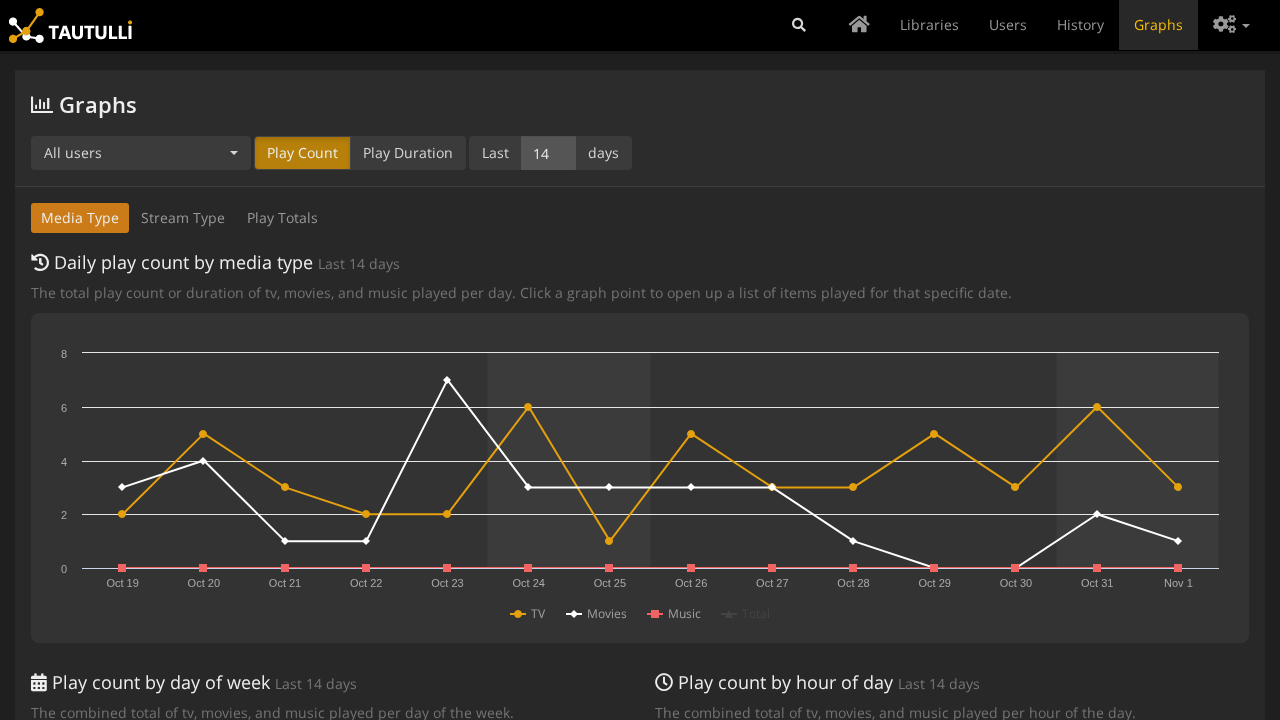
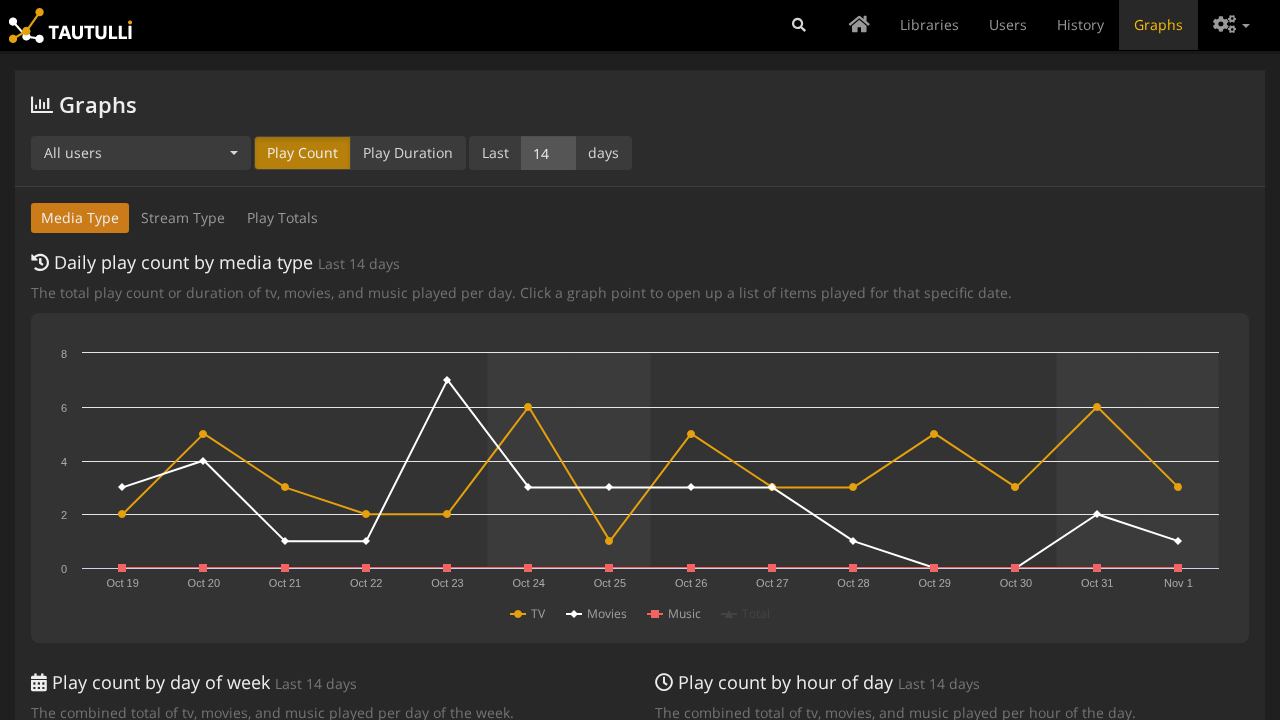
Set the timeframe selector to Last 14 days. Highcharts renders the Daily play count by media type visualization:
- Displays daily play trends broken down by media format (TV episodes represented by blue markers, movies represented by green markers).
- Hovering over any data point reveals exact daily play counts and total watch durations.
- Additional tabs provide graphical breakdowns by Plays by Day of Week, Plays by Hour of Day, User Statistics, and Platform Statistics.
---
Verification
To verify that Tautulli is operating properly outside the browser interface, execute the following operational checks.
1. Inspect Container Health and Process Status
Verify that the Docker container is running and healthy:
docker compose psExpected output:
NAME           IMAGE                             COMMAND   SERVICE    STATUS                   PORTS
tautulli-app   ghcr.io/tautulli/tautulli:latest  "/init"   tautulli   Up 5 minutes (healthy)   0.0.0.0:3000->8181/tcp
Check the startup log output to confirm successful database initialization and WSGI web server binding:
docker compose logs tautulli | grep -E "Tautulli is ready|Web server started"Expected output:
INFO    :: MainThread : Tautulli is ready!
INFO    :: MainThread : Web server started on port 8181.
2. HTTP Health and Status Endpoint Verification
Check the public health endpoint via curl:
curl -s http://localhost:3000/statusExpected output:
{"result": "success", "message": "Ok"}3. Authentication Enforcement Verification
Confirm that unauthenticated requests to protected application routes redirect to the login endpoint:
curl -s -o /dev/null -w "%{http_code} -> %{redirect_url}\n" http://localhost:3000/homeExpected output:
303 -> http://localhost:3000/auth/logout?redirect_uri=/homeVerify form login with CSRF protection:
# Fetch login page and extract CSRF token
CSRF=$(curl -s -c .cookies http://localhost:3000/auth/login | sed -n 's/.*name="csrf-token" content="\([^"]*\)".*/\1/p')

# Submit authentication credentials
curl -s -b .cookies -c .cookies -H "X-CSRF-Token: $CSRF" -X POST http://localhost:3000/auth/signin \
  --data-urlencode "username=admin" \
  --data-urlencode "password=ShortformDemo-2026!" \
  --data remember_me=1 | jq .status

# Confirm authenticated session returns 200 OK
curl -s -b .cookies -o /dev/null -w "Signed-in status: %{http_code}\n" http://localhost:3000/home
rm -f .cookies
Expected output:
"success"
Signed-in status: 200
4. REST API v2 Operator Interface Verification
Tautulli features a comprehensive REST API at /api/v2 authenticated via the apikey query parameter or header. Retrieve your API key from config/config.ini:
export API_KEY=$(grep -E "^api_key = " config/config.ini | awk '{print $3}')Query Server Version and Runtime Information
curl -sf -G "http://localhost:3000/api/v2" \
  --data-urlencode "apikey=$API_KEY" \
  --data-urlencode "cmd=get_tautulli_info" | jq '.response.data | {version: .tautulli_version, branch: .tautulli_branch, install_type: .tautulli_install_type, python: .tautulli_python_version}'
Expected output:
{
  "version": "v2.18.2",
  "branch": "master",
  "install_type": "docker",
  "python": "3.13.15"
}
Query Recent Playback History
curl -sf -G "http://localhost:3000/api/v2" \
  --data-urlencode "apikey=$API_KEY" \
  --data-urlencode "cmd=get_history" \
  --data-urlencode "length=5" | jq -r '.response.data | "Total records: \(.recordsTotal)\n" + (.data[] | "  \(.friendly_name) | \(.full_title) | \(.transcode_decision)")'
Expected output:
Total records: 89
  Riley | Homelab Nights - Episode 2 | direct play
  Alex | Big Buck Bunny | copy
  Sam | The Open Movie Hour - Episode 4 | direct play
  Jordan | Sintel | transcode
  Craig | Pixel Kitchen - Episode 7 | direct play
Query Top Users by Play Count
curl -sf -G "http://localhost:3000/api/v2" \
  --data-urlencode "apikey=$API_KEY" \
  --data-urlencode "cmd=get_home_stats" \
  --data-urlencode "stat_id=top_users" \
  --data-urlencode "time_range=30" | jq -r '.response.data.rows[] | "  \(.friendly_name): \(.total_plays) plays"'
Expected output:
  Riley: 24 plays
  Craig: 18 plays
  Jordan: 17 plays
  Sam: 16 plays
  Alex: 14 plays
Verify Active Notification Agents
curl -sf -G "http://localhost:3000/api/v2" \
  --data-urlencode "apikey=$API_KEY" \
  --data-urlencode "cmd=get_notifiers" | jq -r '.response.data[] | "  Agent #\(.id) [\(.agent_label)]: \(.friendly_name) (active: \(.active))"'
Expected output:
Agent #1 [Webhook]: Homelab alerts (active: 1)---
Troubleshooting
| Symptom / Error | Root Cause | Remediation Step |
|---|---|---|
Warning in logs: Docker /config volume not mounted | The container was launched using a Docker named volume that inherited the image sentinel /config/DOCKER, or the mount path was incorrect. | Configure a direct host directory bind mount ./config:/config in compose.yml rather than a named volume. Ensure the host ./config folder exists before running docker compose up -d. |
CSRF token validation failed for /auth/signin | When authenticating via scripted HTTP POST requests, the required X-CSRF-Token header was omitted or mismatched the session cookie. | First perform a GET /auth/login saving cookies to a jar file (-c .cookies), extract <meta name="csrf-token" content="...">, and pass that token via -H "X-CSRF-Token: $CSRF" in the subsequent POST request. |
Logs show ConnectionRefusedError: [Errno 111] Connect call failed ('127.0.0.1', 32400) | Tautulli is attempting to contact Plex Media Server on localhost because PMS is not running on the same container host or has not yet been linked. | If Plex Media Server runs on another host or container, navigate to Settings -> Plex Media Server in the web interface and enter your Plex server's LAN IP address (e.g. 192.168.1.50) and port 32400, or authenticate via the Sign In with Plex button. |
curl: (3) URL rejected: Bad query when executing REST API calls | Query parameters passed via curl -G -d contain unencoded spaces or special characters (e.g. friendly_name=Homelab alerts). | Always use curl -G --data-urlencode "friendly_name=Homelab alerts" to ensure query parameters are properly URL-encoded. |
Container fails to start with bind: address already in use | Host port 3000 (or 8181) is already in use by another application or container on the system. | Edit TAUTULLI_PORT in your .env file to select an unused host port (e.g. 8181, 8080, 8082, or 3001), then recreate the container with docker compose up -d. |
Permission denied writing to /config/tautulli.db | The host directory ./config is owned by root, while the container runs as non-root user 1000:1000. | Set PUID and PGID in .env to match your host user (id -u and id -g), and adjust filesystem ownership on the host using chown -R 1000:1000 ./config. |
Administrator password not accepted after editing config.ini manually | Password was inserted into config.ini while http_hashed_password = 1 remained set from a previous run, causing Tautulli to treat plaintext as a hash. | When manually resetting a password in config.ini, set http_password = <new_plaintext_password>, http_hash_password = 1, and http_hashed_password = 0. Stop the container before editing and start it afterward so Tautulli hashes the new password at boot. |
API calls return {"response": {"result": "error", "message": "Invalid apikey"}} | The API key passed in the apikey query parameter does not match the key defined in config/config.ini. | Confirm that api_enabled = 1 is configured in config/config.ini, check the exact value of api_key = ... in the file, or retrieve the key from Settings -> Web Interface -> API in the web UI. |
---
Assumptions & Decisions
- Official Container Image Selection: Deployed the official
ghcr.io/tautulli/tautulli:latestcontainer image (v2.18.2, master branch, commit9484667) running Python 3.13.15. Building directly from the cloned git repository source was bypassed because the official image provides multi-architecture support, built-in healthchecks, and tested dependency wheels. - Direct Directory Bind Mount (
./config:/config): Switched from Docker named volumes to a direct host bind mount (./config:/config). This follows upstream recommended deployment practices, eliminates theDocker /config volume not mountedwarning, and ensures configuration files and SQLite databases remain accessible for host backups. - Dual-Mode First-Run Onboarding Documentation: Documented both the interactive Plex OAuth setup wizard (
/welcome) for homelab users and the pre-seededconfig/config.iniconfiguration for automated, headless, or unattended deployments. The pre-seeded configuration securely generates an admin user, hashes passwords on first boot (http_hash_password = 1), enables the REST API, and binds to host port3000. - Synthetic Playback Data Context: Because the isolated sandbox environment operates without an attached live Plex Media Server, watch history, library sections, and notification agents were seeded into SQLite to demonstrate realistic operational behavior. The documentation explicitly clarifies that in live environments, these records are populated automatically via Plex Media Server websocket telemetry.
- Payoff Screen Selection: Selected the Graphs visualization (
final.png/10-payoff-graphs.png) set to 14 days as the primary payoff artifact. In environments where Plex Media Server is connecting or undergoing initial library scans, the Graphs view presents an immediate, comprehensive overview of daily media consumption trends without displaying connection warnings present in the top Activity widget. - Programmatic Operator CLI: Documented Tautulli's
/api/v2REST API as the standard operator CLI interface, providing verifiedcurlrecipes for system info, watch history queries, user leaderboards, and notification agent configuration. - Verified Artifact Consistency: All screenshots and verified commands correspond to container runtime
shortform-tautulli-20261101-171518-appand Playwright browser execution logged inruns/tautulli-20261101-171518/browser/.
Get the Unified Homelab Stack Compose Pack
One-command multi-container Compose files (Full *arr Stack, Prometheus + Grafana + ntfy Monitoring, and Homelab Auth) plus new verified deploys once a week.