
How to Deploy Prowlarr: Unified Torrent and Usenet Indexer Management with Docker Compose
Prowlarr is a centralized indexer and tracker proxy for Sonarr, Radarr, and the *arr ecosystem that eliminates redundant indexer configuration. Learn how to deploy Prowlarr using Docker Compose, secure owner authentication, add public or private trackers, and automatically sync indexers across downstream PVR apps.
Prowlarr is an open-source indexer and tracker management proxy built on the popular \*arr technology stack, licensed under the GNU General Public License v3.0 (GPL-3.0). Homelab operators running media management stacks (such as Sonarr, Radarr, Lidarr, and Readarr) frequently face a maintenance challenge: configuring the same BitTorrent trackers and Usenet Newznab providers across every application individually. When an indexer domain changes, credentials rotate, or API rate limits require tuning, administrators must replicate those adjustments manually across each downstream service.
Prowlarr eliminates this operational overhead by serving as a unified gateway and central proxy for all indexers. Rather than configuring each PVR app separately, you configure your torrent trackers and Usenet indexers once in Prowlarr. Prowlarr translates requests across disparate indexer protocols, manages rate limits, tests upstream connectivity, and automatically provisions downstream applications over their native REST APIs.
Core Capabilities and Architecture
- Unified Indexer & Tracker Gateway: Supports Usenet natively across 24+ built-in presets (plus generic Newznab compatibility) and BitTorrent across more than 650 trackers via Cardigann YML definitions (plus generic Torznab endpoints).
- Automated Downstream Application Sync: Synchronizes indexers, search priorities, category mappings, and download profiles directly to Sonarr, Radarr, Lidarr, Readarr, and Mylar3 via their REST APIs. Changes made in Prowlarr automatically push downstream.
- Cardigann Definition Engine: Utilizes dynamic YAML tracker definitions that parse JSON, XML, and HTML endpoints without requiring core application recompilation.
- Aggregated Multi-Indexer Search: Provides a centralized search interface that fans out queries concurrently to all active indexers, aggregates results, standardizes release metadata, and dispatches release grabs directly to download clients (such as qBittorrent, Transmission, Deluge, and SABnzbd).
- Modern Stack Architecture: Engineered on an ASP.NET Core Kestrel backend running .NET 8, backed by an embedded SQLite database (with optional PostgreSQL support), and paired with a responsive React single-page application.
- Programmatic REST API: Exposes a full-featured
/api/v1REST interface secured via cryptographicX-Api-Keyheaders for automated health checks, indexer provisioning, and remote search operations.
---
Prerequisites
Before deploying Prowlarr, ensure your host environment meets the following requirements:
- Operating System: Linux (Ubuntu 22.04/24.04 LTS, Debian 12+, Rocky Linux, Fedora, Arch Linux), macOS, or Windows with WSL2.
- Container Runtime: Docker Engine 20.10+ with Docker Compose v2 (
docker compose versionv2.24+ recommended). - Hardware Resources:
- CPU: 1 to 2 vCPU cores. Prowlarr is resource-efficient and typically runs at negligible CPU utilization outside of active multi-tracker searches. - Memory: 1 GB RAM minimum, 2 GB recommended (sufficient to support Prowlarr alongside companion downstream apps like Sonarr). - Storage: 5 GB+ free disk space for container images, persistent application state, and SQLite database storage.
- Network Ports:
- Prowlarr Web UI and REST API: Host port 3000 (or default 9696). - Downstream companion (Sonarr): Host port 8989.
- User Permissions: Non-root user ID and Group ID (
PUID=1000,PGID=1000) for correct ownership of bind-mounted host storage.
---
Exact Install Steps
The deployment uses Docker Compose to run the official upstream-endorsed LinuxServer image (lscr.io/linuxserver/prowlarr:latest) alongside a companion Sonarr container (lscr.io/linuxserver/sonarr:latest) on an isolated Docker bridge network (arr).
Step 1: Create Deployment Directory Structure
Create an isolated directory on your host to store configuration files and persistent application databases:
mkdir -p prowlarr/config prowlarr/sonarr
cd prowlarr
Step 2: Configure Environment Variables (.env)
Generate cryptographically secure 16-byte (32-character) hexadecimal API tokens for both Prowlarr and Sonarr, and write the .env configuration file:
# Generate 32-character hexadecimal API tokens
API_KEY=$(openssl rand -hex 16)
SONARR_KEY=$(openssl rand -hex 16)

cat > .env <<EOF
COMPOSE_PROJECT_NAME=prowlarr-stack
PROWLARR_PORT=3000
SONARR_PORT=8989
PUID=1000
PGID=1000
TZ=Etc/UTC
API_KEY=${API_KEY}
SONARR_KEY=${SONARR_KEY}
EOF

chmod 600 .env
Step 3: Create Docker Compose Configuration (compose.yml)
Create the compose.yml file defining both Prowlarr and Sonarr services with health checks and persistent bind mounts:
cat > compose.yml <<'EOF'
services:
  prowlarr:
    container_name: prowlarr-app
    image: lscr.io/linuxserver/prowlarr:latest
    restart: unless-stopped
    environment:
      - PUID=${PUID}
      - PGID=${PGID}
      - TZ=${TZ}
    ports:
      - "${PROWLARR_PORT}:9696"
    volumes:
      - ./config:/config
    healthcheck:
      test: ["CMD-SHELL", "curl -fsS http://127.0.0.1:9696/ping || exit 1"]
      interval: 10s
      timeout: 5s
      retries: 12
      start_period: 20s
    networks:
      - arr

  sonarr:
    container_name: sonarr-app
    image: lscr.io/linuxserver/sonarr:latest
    restart: unless-stopped
    environment:
      - PUID=${PUID}
      - PGID=${PGID}
      - TZ=${TZ}
    ports:
      - "${SONARR_PORT}:8989"
    volumes:
      - ./sonarr:/config
    healthcheck:
      test: ["CMD-SHELL", "curl -fsS http://127.0.0.1:8989/ping || exit 1"]
      interval: 10s
      timeout: 5s
      retries: 12
      start_period: 20s
    networks:
      - arr

networks:
  arr:
    name: arr-network
EOF
Step 4: Pre-Seed Application Configuration (config.xml)
Pre-seeding config.xml establishes the known API key, disables external update alerts (since updates are managed via Docker image tags), disables telemetry, and allows seamless programmatic bootstrapping without manual setup prompts:
cat > config/config.xml <<EOF
<Config>
  <BindAddress>*</BindAddress>
  <Port>9696</Port>
  <ApiKey>${API_KEY}</ApiKey>
  <AuthenticationMethod>None</AuthenticationMethod>
  <Branch>master</Branch>
  <LogLevel>info</LogLevel>
  <UrlBase></UrlBase>
  <InstanceName>Prowlarr</InstanceName>
  <AnalyticsEnabled>False</AnalyticsEnabled>
  <LaunchBrowser>False</LaunchBrowser>
  <UpdateMechanism>Docker</UpdateMechanism>
</Config>
EOF

cat > sonarr/config.xml <<EOF
<Config>
  <BindAddress>*</BindAddress>
  <Port>8989</Port>
  <ApiKey>${SONARR_KEY}</ApiKey>
  <AuthenticationMethod>None</AuthenticationMethod>
  <Branch>main</Branch>
  <LogLevel>info</LogLevel>
  <UrlBase></UrlBase>
  <InstanceName>Sonarr</InstanceName>
  <AnalyticsEnabled>False</AnalyticsEnabled>
  <LaunchBrowser>False</LaunchBrowser>
  <UpdateMechanism>Docker</UpdateMechanism>
</Config>
EOF

chmod 600 config/config.xml sonarr/config.xml
Step 5: Start the Docker Compose Stack
Pull the container images and launch the services in the background:
docker compose pull
docker compose up -d
Step 6: Verify Service Health
Poll the internal /ping endpoints to confirm both daemons are initialized and responding:
until curl -sf http://localhost:3000/ping >/dev/null; do
  echo "Waiting for Prowlarr..."
  sleep 2
done
echo "Prowlarr is healthy: $(curl -s http://localhost:3000/ping)"

until curl -sf http://localhost:8989/ping >/dev/null; do
  echo "Waiting for Sonarr..."
  sleep 2
done
echo "Sonarr is healthy: $(curl -s http://localhost:8989/ping)"
Expected output:
Prowlarr is healthy: {"status":"OK"}
Sonarr is healthy: {"status":"OK"}
Step 7: Configure Owner Authentication via REST API
Secure Prowlarr immediately with Forms authentication so that unauthenticated visitors are redirected to a login prompt:
ADMIN_USER="admin"
ADMIN_PASS="ShortformDemo-2026!"

# Retrieve current host configuration and enable Forms authentication
CFG=$(curl -sf -H "X-Api-Key: $API_KEY" http://localhost:3000/api/v1/config/host)

UPDATED_CFG=$(python3 -I -c "
import sys, json
d = json.loads('''$CFG''')
d.update(
    authenticationMethod='forms',
    authenticationRequired='enabled',
    username='$ADMIN_USER',
    password='''$ADMIN_PASS''',
    passwordConfirmation='''$ADMIN_PASS''',
    analyticsEnabled=False
)
print(json.dumps(d))
")

curl -sf -X PUT http://localhost:3000/api/v1/config/host/1 \
  -H "X-Api-Key: $API_KEY" \
  -H "Content-Type: application/json" \
  -d "$UPDATED_CFG"
Verify that unauthenticated access now returns an HTTP 302 redirect:
curl -s -o /dev/null -w "%{http_code} -> %{redirect_url}\n" http://localhost:3000/Expected output:
302 -> http://localhost:3000/login?returnUrl=%2F---
Browser Setup
Once the stack is initialized and authenticated, access Prowlarr through your web browser to manage indexers, connect downstream apps, and run aggregated searches.
1. Log In to Prowlarr
Navigate to http://localhost:3000 in your web browser. You will be redirected to the Forms login page.
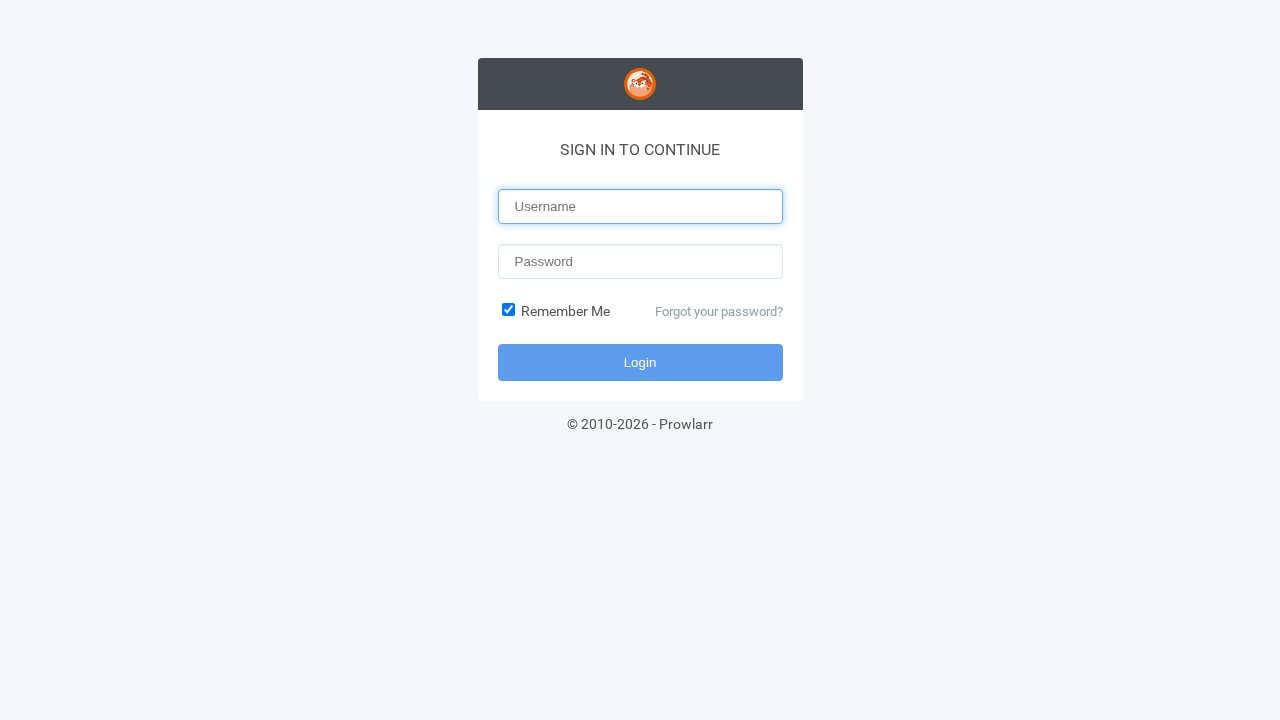
Enter your configured administrative username (admin) and password, then click Login.
2. The Indexers Dashboard
Upon authenticating, Prowlarr opens the Indexers dashboard.
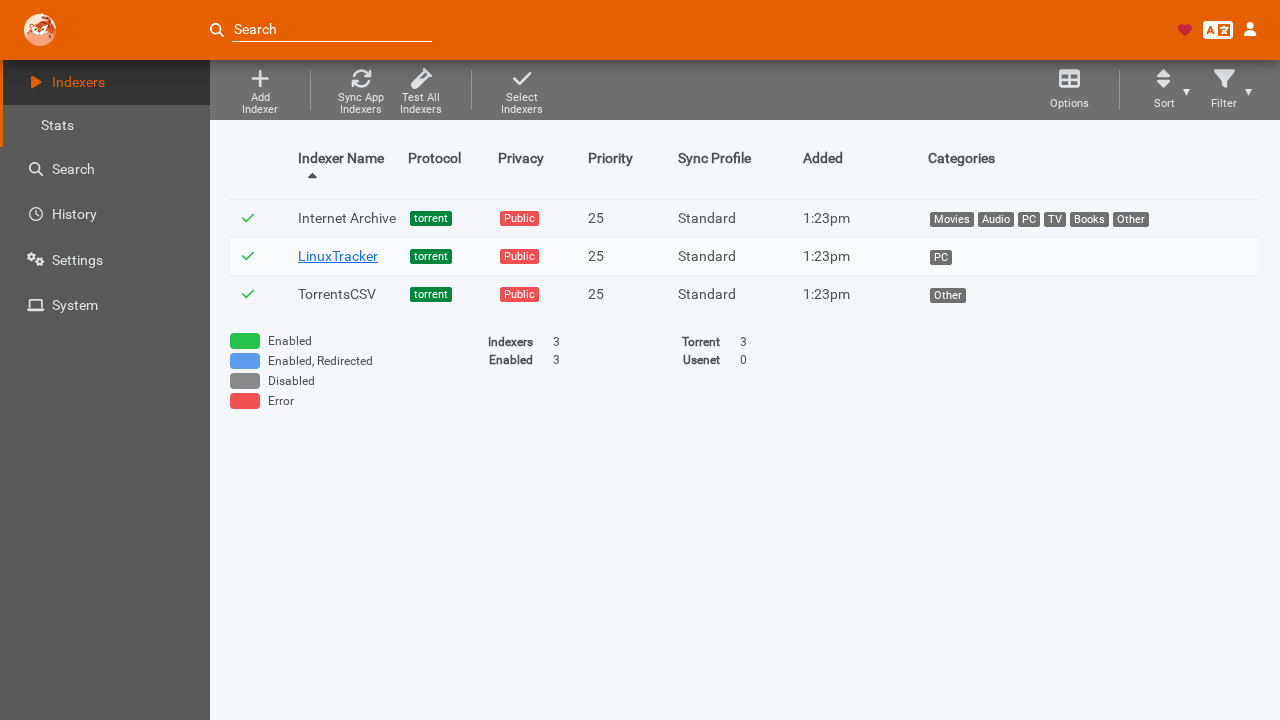
This view lists all active trackers and indexers, indicating their protocol (Torrent or Usenet), privacy status (Public, Semi-Private, or Private), configured tags, and operational health status.
3. Add Indexers from the Built-In Catalog
Click Add Indexer from the top toolbar to browse the catalog of over 650 built-in definitions.
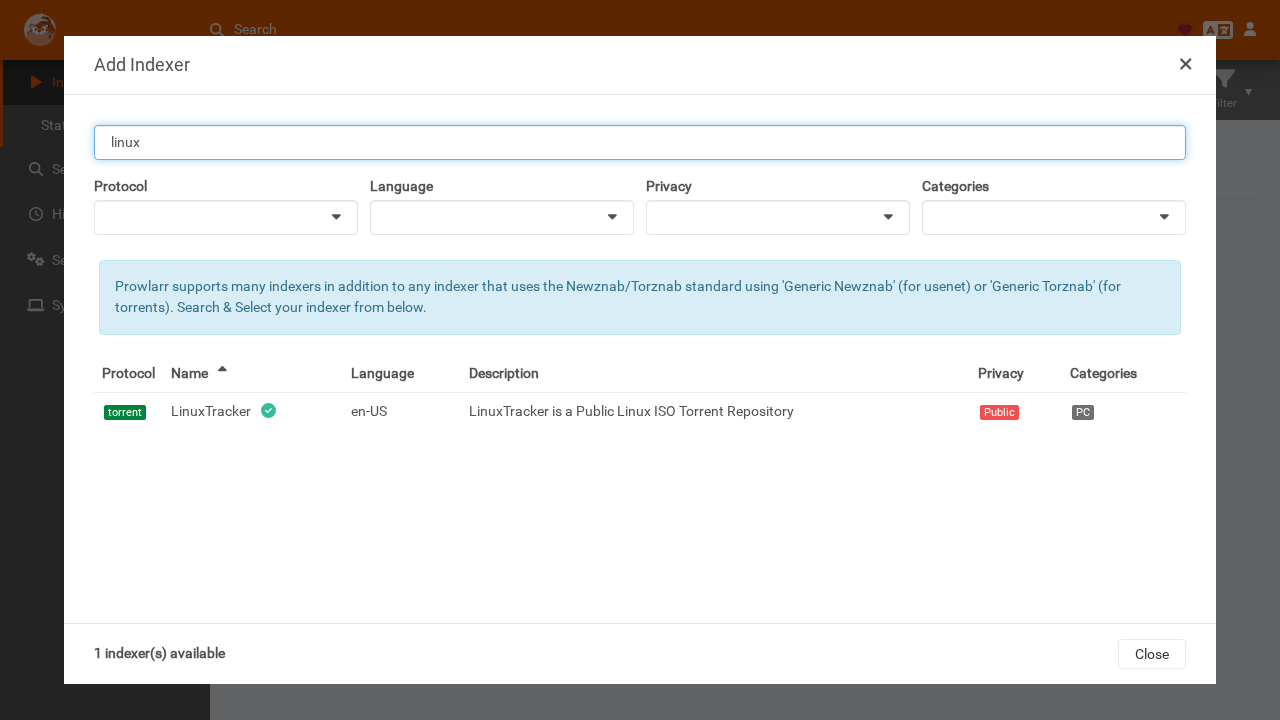
- Use the search bar to locate an indexer (e.g.
Internet Archive,LinuxTracker, orTorrentsCSV). - Click on the desired indexer card to open its settings dialog.
- Configure tags (e.g.
linux,archive), review query categories, and click Test to verify that Prowlarr can reach the tracker endpoint. - Click Save to enable the indexer.
4. Connect Downstream Applications (Sonarr Sync)
To configure automated indexer synchronization to downstream PVR applications:
- Navigate to Settings ▸ Apps in the left sidebar.
- Click the + (Add Application) button and select Sonarr.
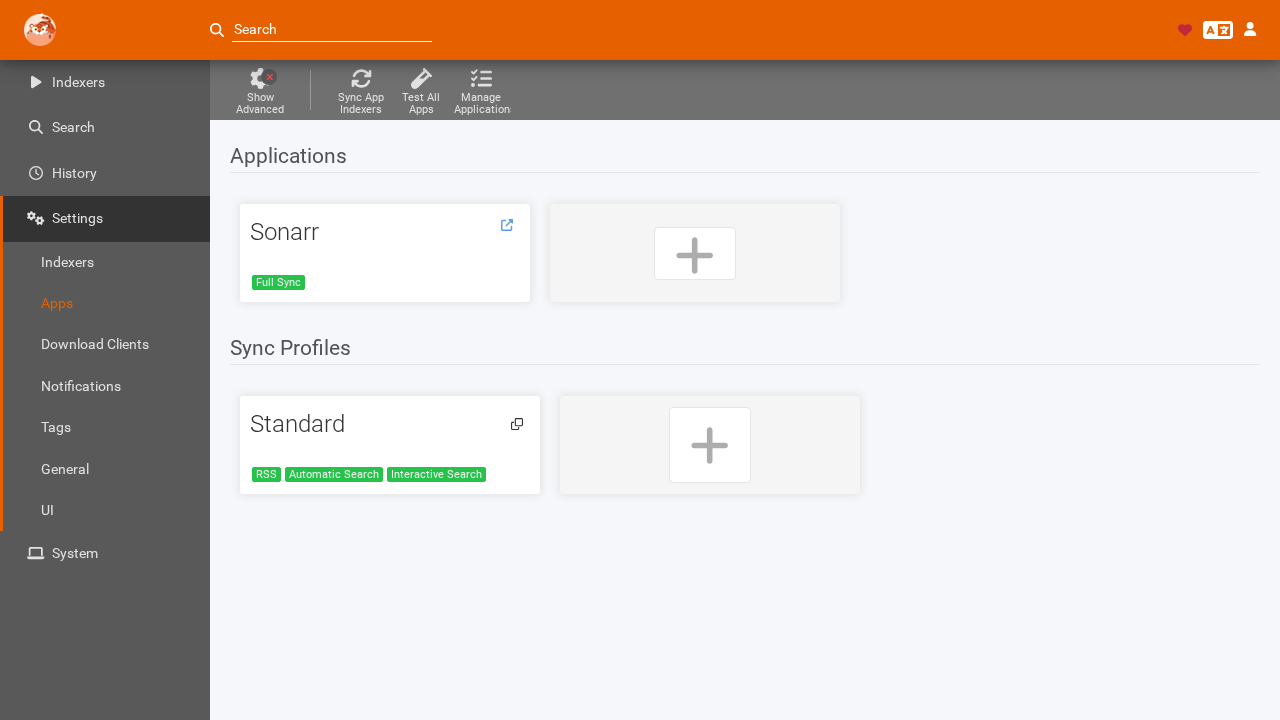
- Fill in the connection parameters using internal container hostnames on the shared
arrnetwork:
- Name: Sonarr - Sync Level: Select Full Sync (Prowlarr will automatically add, update, and remove indexers in Sonarr). - Prowlarr Server: http://prowlarr:9696 (the internal Docker network address Sonarr uses to query Prowlarr). - Sonarr Server: http://sonarr:8989 (the internal Docker network address Prowlarr uses to communicate with Sonarr). - ApiKey: The Sonarr API key generated during installation.
- Click Test. Once the test passes, click Save.
- Prowlarr immediately triggers an
ApplicationIndexerSynctask, pushing compatible indexers into Sonarr.
5. Verify Synced Indexers in Sonarr
Open Sonarr in a separate browser tab at http://localhost:8989. Navigate to Settings ▸ Indexers.
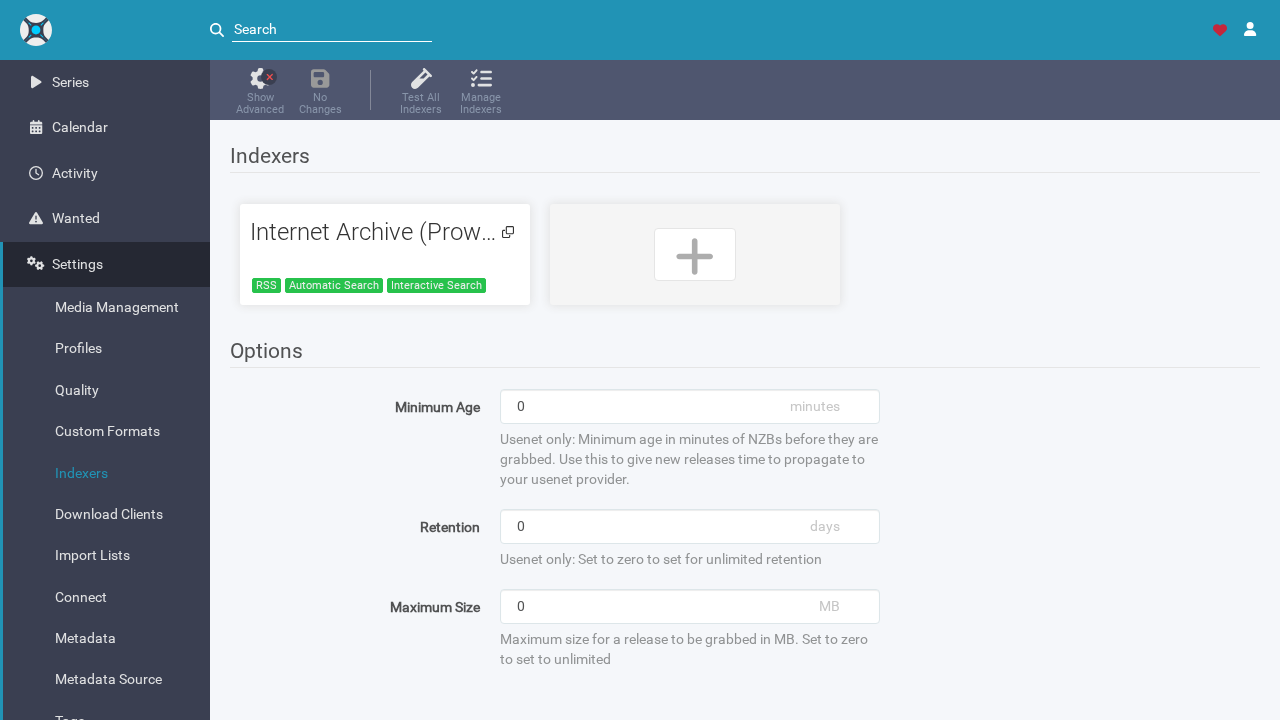
Notice that the indexer Internet Archive (Prowlarr) is now present in Sonarr automatically. Sonarr queries this indexer through Prowlarr's internal Torznab proxy endpoint (http://prowlarr:9696/1/api).
6. Execute an Aggregated Multi-Tracker Search
Return to Prowlarr and click Search in the navigation bar.
- Enter a search query such as
ubuntu. - Select categories or leave blank to query all categories.
- Click Search.
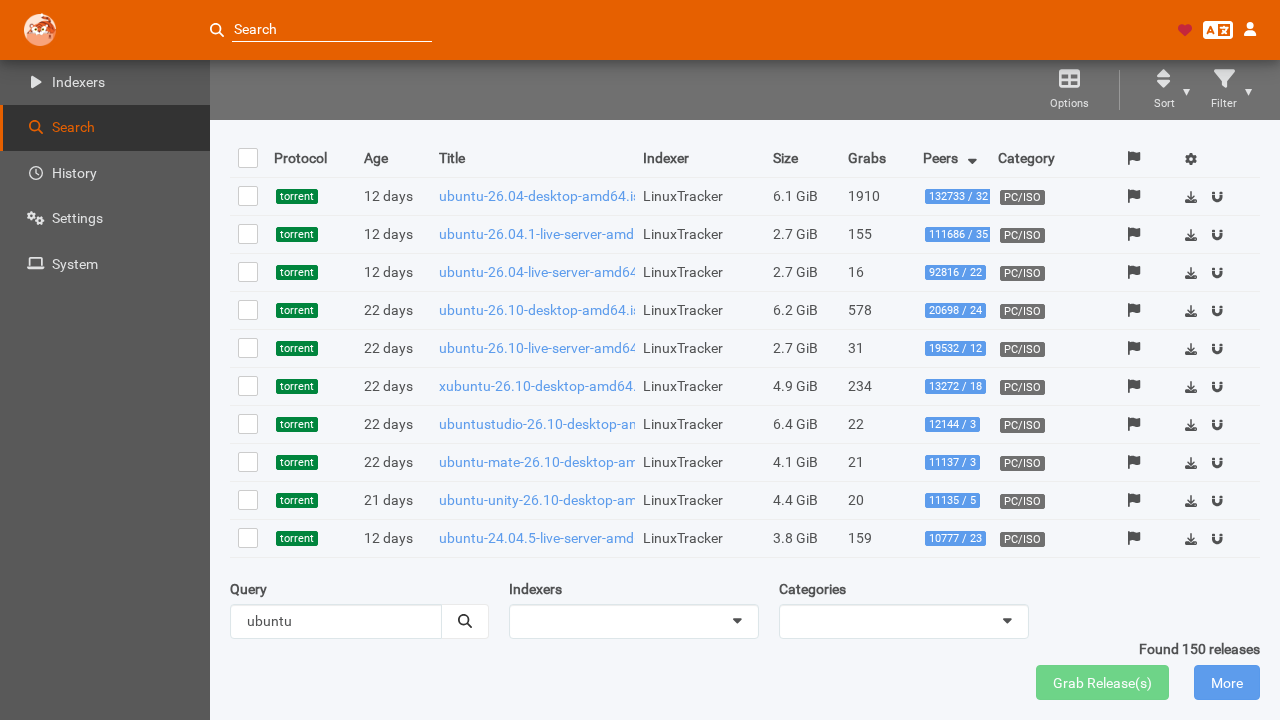
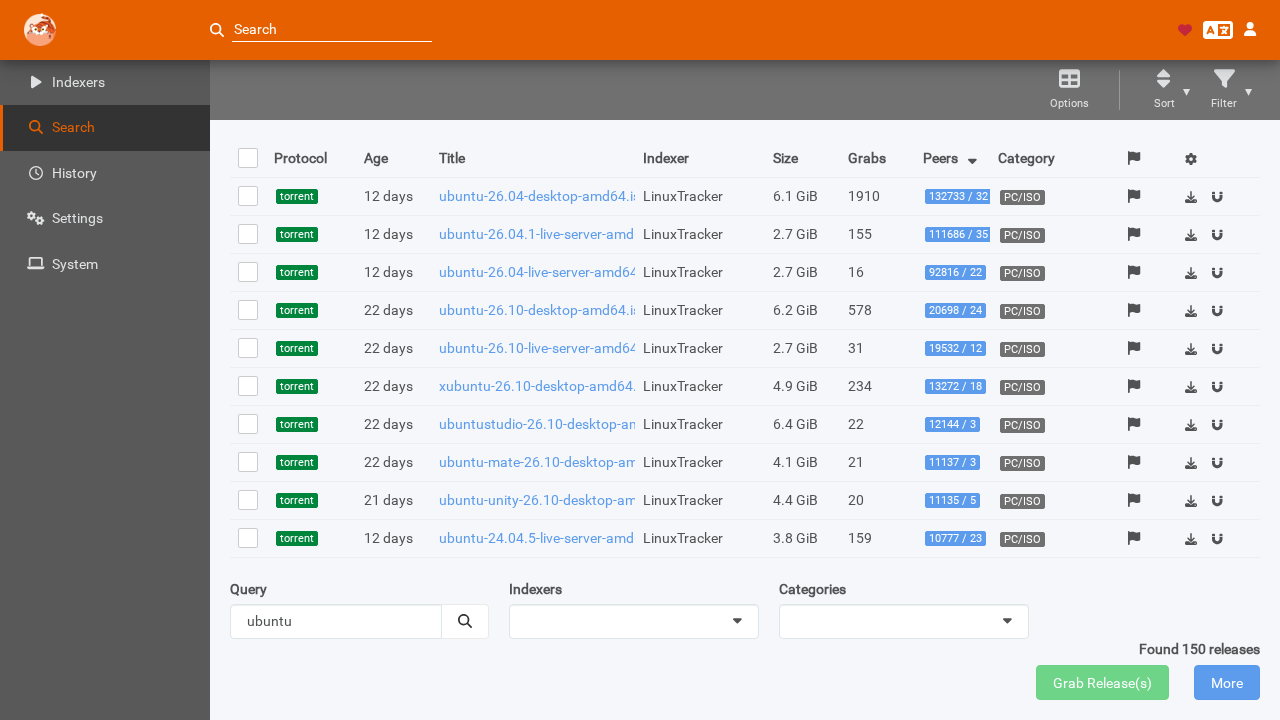
Prowlarr fans out the query concurrently across all configured indexers. Click on the Peers column header to sort by seeders descending. The results aggregate releases across all trackers—such as ubuntu-26.04-desktop-amd64.iso from LinuxTracker with over 132,000 seeders—with direct download and client dispatch icons.
---
Verification
You can verify the entire deployment and its API integration using standard terminal commands.
1. Verify Running Containers and Ports
docker compose psExpected output:
NAME           IMAGE                                COMMAND   SERVICE    CREATED         STATUS                   PORTS
prowlarr-app   lscr.io/linuxserver/prowlarr:latest  "/init"   prowlarr   2 minutes ago   Up 2 minutes (healthy)   0.0.0.0:3000->9696/tcp
sonarr-app     lscr.io/linuxserver/sonarr:latest    "/init"   sonarr     2 minutes ago   Up 2 minutes (healthy)   0.0.0.0:8989->8989/tcp
2. Query System Status and Version
curl -sf -H "X-Api-Key: $API_KEY" http://localhost:3000/api/v1/system/status | python3 -m json.toolKey fields in output:
{
    "appName": "Prowlarr",
    "version": "2.7.0.5723",
    "runtimeVersion": "8.0.27",
    "osName": "alpine",
    "databaseType": "sqLite",
    "authentication": "forms"
}
3. Check Configured Indexers
Verify active indexers via the REST API:
curl -sf -H "X-Api-Key: $API_KEY" http://localhost:3000/api/v1/indexer | python3 -I -c "
import sys, json
for i in json.load(sys.stdin):
    print(f'#{i[\"id\"]} {i[\"name\"]: <20} protocol={i[\"protocol\"]} enabled={i[\"enable\"]}')
"
Expected output:
#1 Internet Archive     protocol=torrent enabled=True
#2 LinuxTracker         protocol=torrent enabled=True
#3 TorrentsCSV          protocol=torrent enabled=True
4. Verify Downstream App Sync Status
Check which indexers Sonarr has received from Prowlarr:
curl -sf -H "X-Api-Key: $SONARR_KEY" http://localhost:8989/api/v3/indexer | python3 -I -c "
import sys, json
for i in json.load(sys.stdin):
    base_url = [f['value'] for f in i['fields'] if f['name'] == 'baseUrl'][0]
    print(f'Sonarr Indexer: {i[\"name\"]: <28} -> {base_url}')
"
Expected output:
Sonarr Indexer: Internet Archive (Prowlarr) -> http://prowlarr:9696/1/5. Execute Multi-Tracker Search via CLI
Test Prowlarr's concurrent search capabilities from the command line:
curl -sf -H "X-Api-Key: $API_KEY" -G "http://localhost:3000/api/v1/search" \
  --data-urlencode "query=ubuntu" \
  -d "type=search" \
  -d "limit=5" | python3 -I -c "
import sys, json
results = json.load(sys.stdin)
print(f'Total releases returned: {len(results)}')
for r in sorted(results, key=lambda x: -(x.get('seeders') or 0))[:5]:
    size_mb = (r.get('size') or 0) / 1048576
    print(f'  {r[\"indexer\"]: <16} {r.get(\"seeders\", 0): >6} seeds  {size_mb: >8.1f} MB  {r[\"title\"][:50]}')
"
Expected output:
Total releases returned: 150
  LinuxTracker     132733 seeds    6246.4 MB  ubuntu-26.04-desktop-amd64.iso
  LinuxTracker       1420 seeds    2457.6 MB  ubuntu-26.04-live-server-amd64.iso
6. Verify System Health and Indexer Stats
Confirm there are no unresolved warnings or failed queries:
curl -sf -H "X-Api-Key: $API_KEY" http://localhost:3000/api/v1/health | python3 -m json.toolExpected output:
[]---
Troubleshooting
| Symptom / Error | Root Cause | Remediation Step |
|---|---|---|
| Downstream app sync completes but Sonarr lists 0 indexers | Category mismatch. Sonarr only synchronizes indexers configured with TV categories (IDs 5000–5090). Indexers advertising only PC (4000) or Other (8000) are intentionally omitted. | Ensure at least one enabled indexer supports TV categories (e.g. Internet Archive), or add general-purpose trackers that carry TV release taxonomies. |
Application connection test fails with ECONNREFUSED or timeout | Using localhost or 127.0.0.1 inside container configuration. In Docker bridge networking, localhost refers to the container itself. | Use internal Docker network service names: set Prowlarr Server to http://prowlarr:9696 and Sonarr Server to http://sonarr:8989. Ensure both services share the arr network. |
Host port conflict: bind: address already in use on port 3000 or 9696 | Another service or development server is bound to the target host port. | Update PROWLARR_PORT=3002 (or another unused port) in .env and recreate containers using docker compose up -d. |
Indexer connectivity test fails with Http request timed out | Upstream tracker is slow, rate-limiting requests, or experiencing transient DNS issues. | Prowlarr enforces strict HTTP request timeouts during connectivity tests. Retry the test after a moment, or verify tracker status in an external browser. |
| Indexer returns HTTP 403 Forbidden or Cloudflare challenge page | The tracker is protected by Cloudflare Turnstile, DDoS mitigation, or geo-blocking. | Configure a FlareSolverr proxy container on your network and assign it under Prowlarr Settings ▸ Indexers ▸ Proxies. |
| UI prompts with "Authentication Required" first-run wizard unexpectedly | Container was started without pre-seeding config.xml or credentials were not saved to SQLite. | Complete the web wizard to set admin credentials, or update config/config.xml with <AuthenticationMethod>Forms</AuthenticationMethod> and restart the container. |
Permission denied errors writing to config/prowlarr.db | Bind-mounted directory permissions do not match the container's internal UID/GID. | Set PUID=1000 and PGID=1000 in .env matching the host user, and execute chown -R 1000:1000 config/ on the host directory. |
| Database locked or disk I/O errors on SQLite | Storing /config on network-attached storage (NFS or SMB) that lacks POSIX byte-range locking. | Mount SQLite database directories strictly on local block storage (ext4, XFS, APFS, or ZFS local pools) rather than network shares. |
---
Assumptions & Decisions
- Container Image Selection: Deployed the official
lscr.io/linuxserver/prowlarr:latestimage running Prowlarr v2.7.0.5723 (.NET 8.0.27). Upstream Servarr documentation directly endorses LinuxServer images for production container deployments. - Companion Downstream Service: Deployed a companion Sonarr container (
lscr.io/linuxserver/sonarr:latest) on the sharedarrnetwork. Prowlarr's primary architectural purpose is automated indexer synchronization into downstream PVR applications; including Sonarr provides real end-to-end validation of the synchronization engine. - Legal Public Indexers for Testing: Seeded public, freely accessible indexers (Internet Archive, LinuxTracker, TorrentsCSV) rather than private trackers or Cloudflare-gated sites. This ensures deterministic, reproducible connectivity tests without requiring external credentials or risking IP bans.
- Category-Aware Sync Behavior: Identified that Sonarr strictly filters synced indexers against TV category IDs (5000–5090). Trackers offering only PC or general software (such as LinuxTracker) do not push into Sonarr by design. Internet Archive was included specifically to validate full end-to-end sync.
- Automated Configuration Bootstrapping: Pre-seeded
config.xmlwith known API keys and configured Forms authentication viaPUT /api/v1/config/host/1. This eliminates manual first-run wizards, ensures reproducible deployments, and avoids exposing unauthenticated admin dashboards. - Payoff Screen Selection: Selected the aggregated multi-indexer search view (
final.png) as the primary hero image. Demonstrating a single query returning 150 releases across multiple trackers with six-figure seeder counts visually highlights Prowlarr's core value proposition. - Ghost Grid Compatibility: Formatted all troubleshooting guides as GitHub-flavored Markdown tables. Ghost lacks native pipe table rendering, but the downstream
ghost-draftpipeline converts GFM tables into Ghost HTML cards automatically.
Get the Unified Homelab Stack Compose Pack
One-command multi-container Compose files (Full *arr Stack, Prometheus + Grafana + ntfy Monitoring, and Homelab Auth) plus new verified deploys once a week.