How to Install and Use Farol: Static PR Risk Intelligence and Review Workbench
Farol is an open-source static analysis CLI and GitHub Action that evaluates pull request blast radius and merge risk for TypeScript, Go, and Python. Here is how to install its verified bundle, run its containerized review workbench with Docker Compose, and streamline code reviews with dynamic risk scoring.
Farol (*Portuguese for "lighthouse"*) is an open-source (MIT licensed) static analysis command-line utility and GitHub Action that solves the primary human bottleneck in modern software engineering: pull request code review.
In an era where autonomous AI coding agents (Claude Code, Cursor, Copilot) author voluminous pull requests in seconds and automated review bots flood PRs with noisy line-by-line comments, human attention remains the scarce, indispensable resource. Spread thin across dozens of PRs, human review degrades into superficial skimming—allowing a single-line modification to a shared database model, API handler, or utility function to silently take down production services.
Farol operates after AI review, not instead of it. While AI models review code probabilistically on disconnected diff hunks, Farol analyzes the entire repository before and after a change using real compiler APIs (TypeScript Compiler API ts.createProgram, go/types, and Python's standard library ast). It produces deterministic, reproducible blast radius intelligence before any human reviewer opens the diff:
- What does this change reach? Enumerates every existing web page, REST/GraphQL endpoint, gRPC method, background worker, and CLI command that executes the modified code, including full call chains.
- How risky is the merge? Computes a dynamic 0–100 merge risk score and assigns a clear review verdict (*Fast track*, *Quick review*, or *Careful review*).
- Where do I start? Pinpoints a prioritized "Must check" checklist (breaking API contracts, SQL injection sinks, lint failures) and files tiered by individual risk weight, highlighting untested lines directly in the diff.
Farol operates in shadow mode: it acts as an advisory intelligence layer that informs reviewers and never blocks merges or breaks CI builds. Crucially, Farol never executes repository code and never imports untrusted modules. Beyond its CLI commands, its flagship deliverable is a self-contained, single-file interactive HTML review workbench (farol html --in farol.json --out farol.html).
Key Capabilities & Architecture
- Multi-Language Static Compiler Analysis:
- TypeScript & React Frontends: Inspects React Router route tables (object and JSX forms, lazy routes, split trees), Next.js Pages and App Router (pages, layouts, middleware, API routes), and TanStack Router file-based routing using the official TypeScript Compiler API. - TypeScript Backends: Analyzes GraphQL schemas (schema files and gql templates) and REST APIs (Fastify, Express), mapping reach per resolver and module. - Go Services: Offline parsing via pure Go standard library packages (go/parser, go/types, go/token). Resolves routes for chi, gin, echo, and standard net/http, gRPC service methods, and main entry points, resolving interface calls to concrete implementations. - Python Services: Offline AST analysis via standard library ast with local type inference. Maps routes and entry points for FastAPI, Flask, Django URLs, Celery tasks, Temporal workflows/activities, Prefect flows, and Model Context Protocol (MCP) tools, resources, and prompts.
- Contract Break Detection:
- Detects removed GraphQL fields or changed argument types. - Flags modified HTTP request and response payloads in Go handlers and FastAPI Pydantic models. - Identifies altered gRPC protobuf definitions and RPC methods before downstream clients break.
- CI Signal Consolidation:
- Diff Coverage: Ingests Istanbul coverage-final.json (Vitest, Jest), go test -coverprofile, or coverage.py JSON (pytest --cov), highlighting the exact modified lines that no test touched. - Static Linting & Security: Integrates reports from ESLint, golangci-lint (gosec), and Ruff (flake8-bandit), plus built-in checks for XSS sinks, dangerous eval, and exposed secrets. - Vulnerability Triaging: Incorporates npm audit, pnpm audit, govulncheck, and pip-audit reports.
- Self-Contained Single-File HTML Review Workbench:
- Generates a standalone single-file HTML report containing embedded JavaScript and CSS. - Features dynamic risk score decrementing as items are reviewed, blast radius exploration, theme toggling, and one-click export of Markdown summaries formatted for GitHub PR comments.
- Fail-Closed Static Safety:
- All analysis occurs completely offline via static AST traversal. - Farol makes zero outbound network calls during analysis (network access is restricted exclusively to optional GitHub PR commenting and Datadog usage metrics).
---
Prerequisites
Before installing and running Farol, ensure your host environment meets the following requirements:
- Operating System: Linux x86_64, macOS, or Windows (WSL2).
- Node.js Runtime: Node.js 22.0.0 or later (required to execute the pre-bundled native CLI or npm package).
- Version Control:
git2.30+ installed and available in$PATH. - Docker & Docker Compose (Optional): Docker Engine 20.10+ and Docker Compose v2.24+ if running the containerized review workbench or sandboxed CLI runner.
- Free Ports: Port
3000available on loopback (127.0.0.1) if serving the local documentation and review workbench container (fallback ports:3002,3003,8080,13000). Note: Farol's CLI itself binds zero network ports. - Zero Host Runtime Pollution: No packages need to be installed globally on your host. Upstream commits a pre-bundled standalone executable that runs without executing
npm install.
Verify your host environment before proceeding:
node --version
git --version
docker compose version
---
Exact Install Steps
You can run Farol via its pre-bundled standalone bundle, directly through npx, or using an isolated Docker Compose stack serving both the interactive review workbench and the CLI.
Method 1: Running the Pre-Bundled Native CLI (Recommended)
Upstream commits a compiled, zero-dependency standalone bundle at dist/cli.js (bundled via tsup targeting Node 22). It requires zero npm install steps and introduces zero package pollution on your host:
# 1. Clone the repository
git clone https://github.com/winnin/farol.git
cd farol

# 2. Verify the pre-bundled CLI executable
node dist/cli.js --version
# Expected output: 0.2.1

# 3. Inspect available subcommands
node dist/cli.js --help
Method 2: Running via npx or Global Package
You can execute Farol directly against any existing repository without cloning:
# Execute via npx
npx @winninjs/farol --version

# Or install locally within a project
npm install --save-dev @winninjs/farol
Method 3: Containerized Review Workbench & CLI via Docker Compose
To inspect the bundled review workbenches (docs/demo/backend.html, docs/demo/frontend.html) and host generated reports locally, stage an isolated Docker Compose environment.
1. Directory Structure
Create an isolated staging directory:
mkdir -p deploy/web deploy/reports2. Create the Web Server Dockerfile
Create deploy/web/Dockerfile to serve documentation and review reports using Alpine Nginx:
FROM nginx:1.27-alpine
# Copy static documentation, demo reports, and assets into webroot
COPY repo/docs /usr/share/nginx/html
EXPOSE 80
CMD ["nginx", "-g", "daemon off;"]
3. Create the Sandboxed CLI Dockerfile
Farol shells out to git to inspect branch differences. When running the CLI in a container, standard slim Node images lack Git. Create deploy/web/cli.Dockerfile with Git pre-installed and safe directory trust configured:
FROM node:22-bookworm-slim
RUN apt-get update && apt-get install -y --no-install-recommends git ca-certificates \
    && rm -rf /var/lib/apt/lists/* \
    && git config --global --add safe.directory '*'
WORKDIR /workspace
4. Create the Docker Compose Specification
Create deploy/docker-compose.yml:
services:
  web:
    build:
      context: ..
      dockerfile: deploy/web/Dockerfile
    container_name: farol-web
    ports:
      - "127.0.0.1:3000:80"
    volumes:
      - ./reports:/usr/share/nginx/html/reports:ro
    restart: unless-stopped
    healthcheck:
      test: ["CMD-SHELL", "wget -q -O /dev/null http://127.0.0.1/ || exit 1"]
      interval: 5s
      timeout: 3s
      retries: 5
      start_period: 5s

  farol:
    build:
      context: ..
      dockerfile: deploy/web/cli.Dockerfile
    container_name: farol-cli
    working_dir: /workspace
    volumes:
      - ../repo:/workspace:ro
    profiles:
      - cli-tools
5. Launch the Review Workbench Container
cd deploy
docker compose up -d --build web
docker compose ps
# Expected status: Container farol-web Up (healthy)
---
Running a Static Analysis Pipeline on a Pull Request
Here is the exact, validated workflow to analyze branch changes, evaluate blast radius, and generate both a markdown triage report and an interactive HTML review workbench.
# 1. Create a scratch clone and demo branch
git clone -q https://github.com/winnin/farol.git sandbox
cd sandbox
git checkout -q -b demo

# 2. Introduce a sample modification to a core file and commit
echo "// Static analysis hook" >> src/report/html.ts
git commit -am "demo: update html report"

# 3. Analyze differences between main and demo branch
node ../farol/dist/cli.js analyze --base main --head demo --out reports/farol.json
# Output: wrote reports/farol.json

# 4. Generate formatted terminal markdown triage report
node ../farol/dist/cli.js report --in reports/farol.json
# Output:
# ### farol · merge risk 23/100 (low) · ◐ quick review
# - 🔴 src/report/html.ts 23 · 4 of 10 operations

# 5. Compile the self-contained interactive HTML review workbench
node ../farol/dist/cli.js html --in reports/farol.json --out reports/farol.html
# Generates single-file ~152 KB interactive workbench at reports/farol.html
---
Browser Setup (Interactive Review Workbench & Demos)
Once the Docker Compose web container is healthy, navigate to the review workbench:
- Primary Review Workbench (FastAPI Backend Demo):
http://localhost:3000/demo/backend.html - Secondary Workbench (React Frontend Demo):
http://localhost:3000/demo/frontend.html - Live Self-Analysis Report:
http://localhost:3000/reports/farol.html - Documentation & Configuration Generator:
http://localhost:3000/
Step-by-Step UI Review Workflow
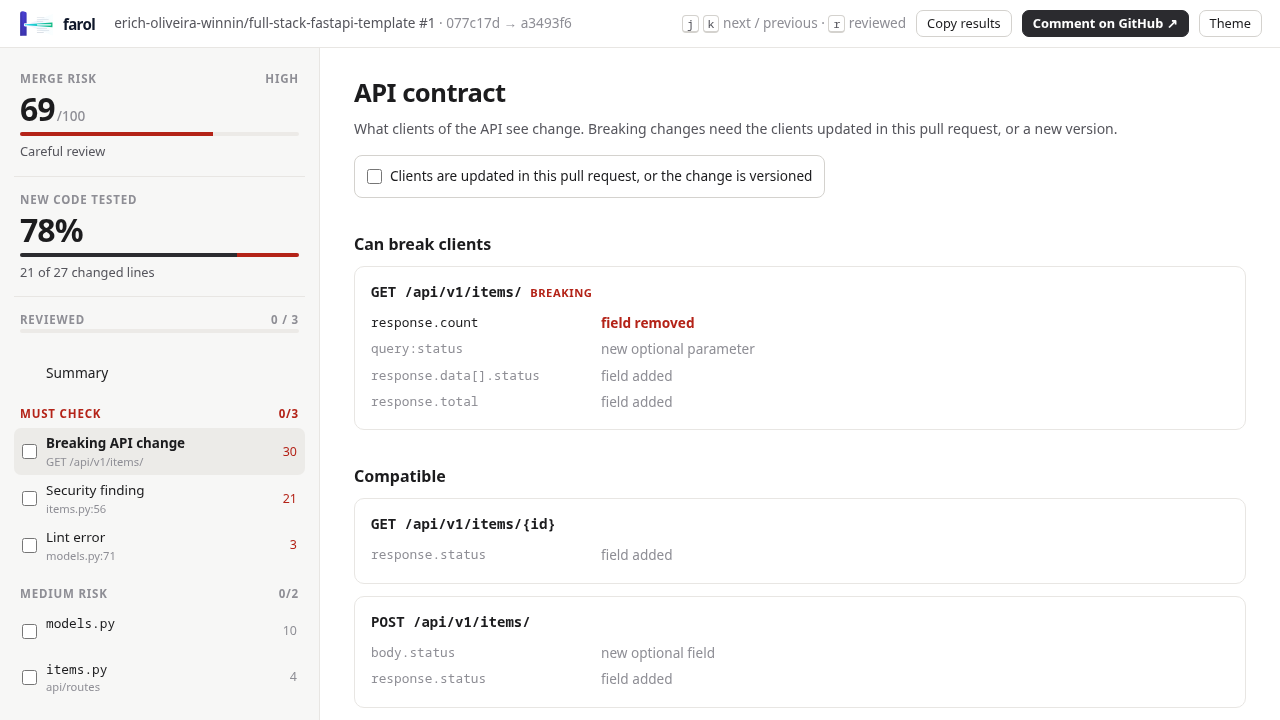
1. Initial State & High Risk Score Gauge
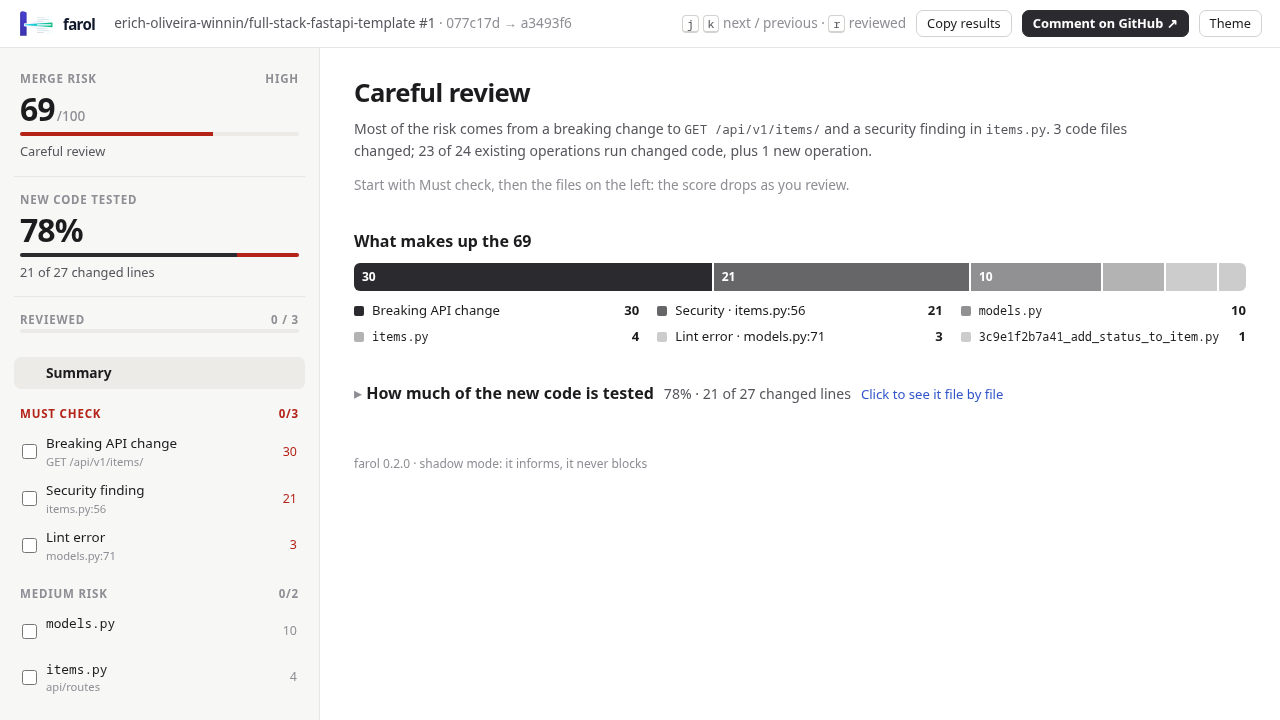
Opening http://localhost:3000/demo/backend.html loads the review workbench representing a pull request on a FastAPI backend service (erich-oliveira-winnin/full-stack-fastapi-template #1).
- The circular risk meter reads 69/100 HIGH with the verdict "Careful review".
- Diff line coverage indicates 78% of new code is tested (21 of 27 lines).
- The prioritized Must check checklist displays
0/3items acknowledged. - Reviewed files progress shows
0 / 4.
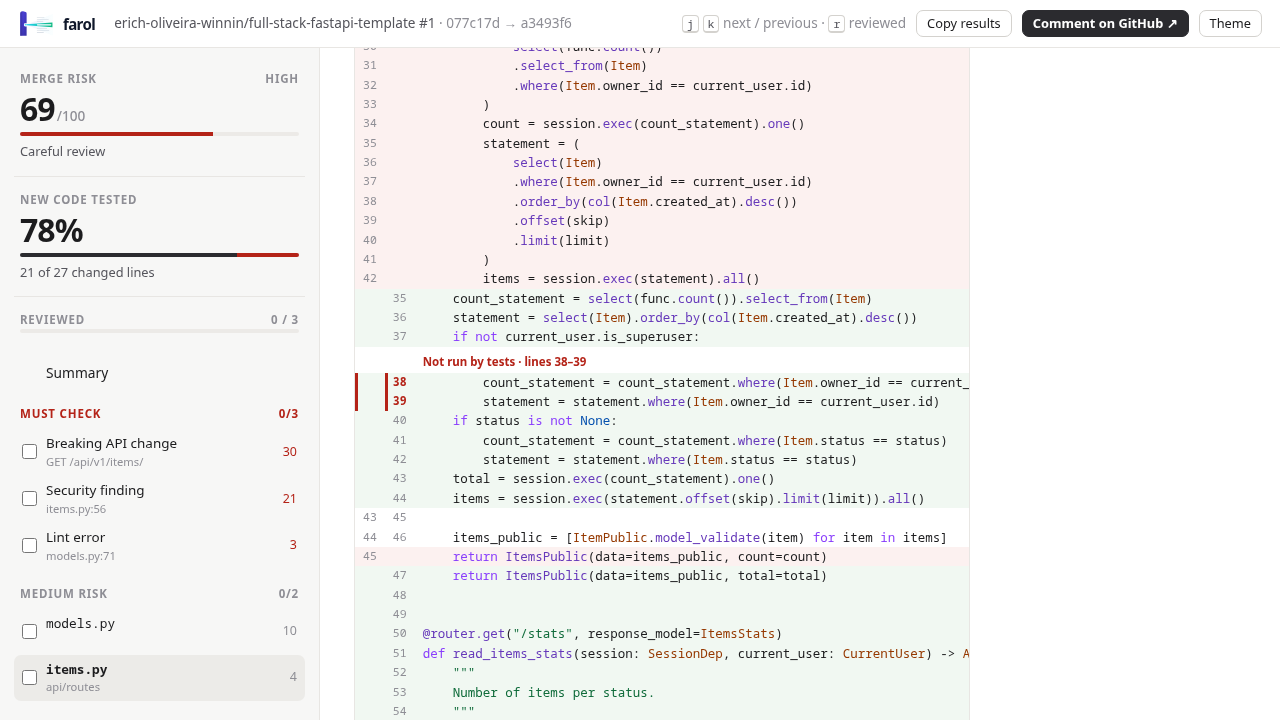
2. Inspecting the Syntax-Highlighted Diff & Untested Lines
Select backend/app/api/routes/items.py in the left file tree. The center pane renders a syntax-highlighted diff table. Notice the prominent red warning banner:
Not run by tests · lines 38–39Untested lines are highlighted directly inside the diff (.d-add.d-unc), showing the reviewer exactly where existing test suites failed to execute newly added code paths.
3. Catching Breaking API Contracts
In the center pane, switch to the Breaking Changes tab or inspect the items list. Farol highlights breaking schema modifications:
GET /api/v1/items/has a breaking contract change detected through static inspection of Pydantic response models.- Reviewers are alerted before downstream API clients break in production.
4. Blast Radius Discovery & Feature Flag Shielding
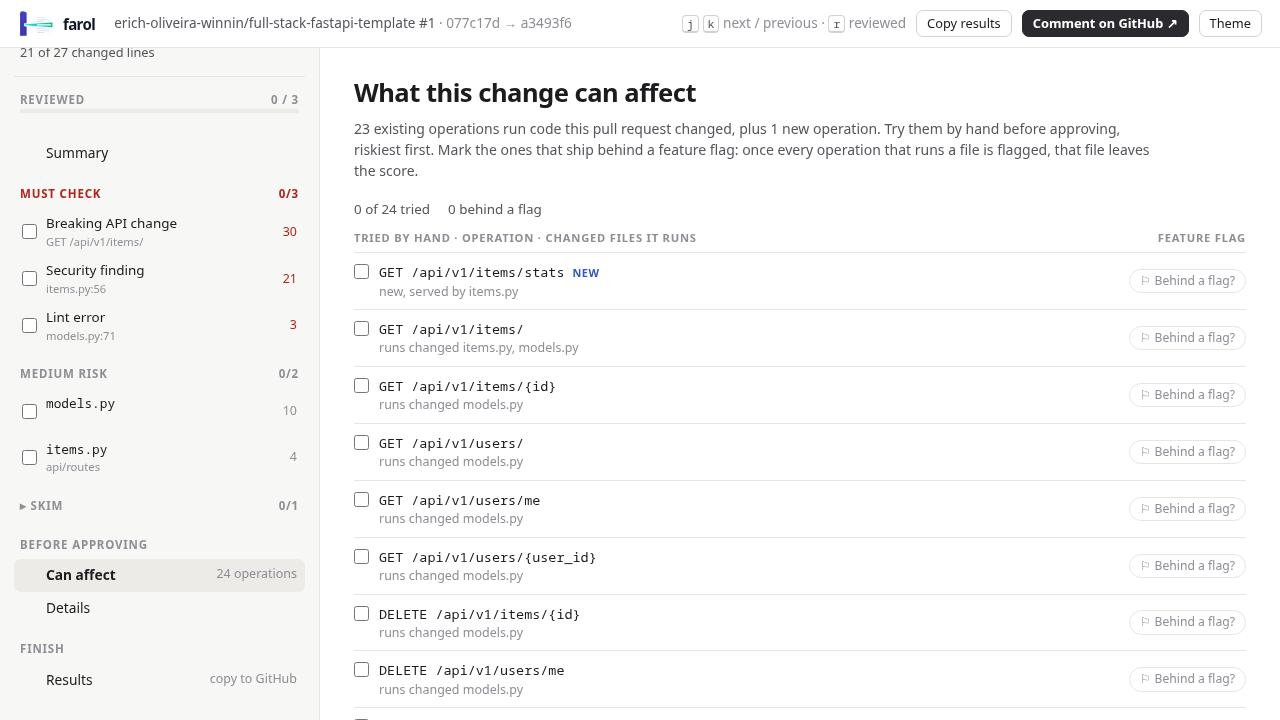
Switch to the Can affect section (#plan) to explore the full blast radius:
- Farol discovers "Can affect 24 operations", listing every public route and endpoint calling the modified code.
- Click the checkbox next to
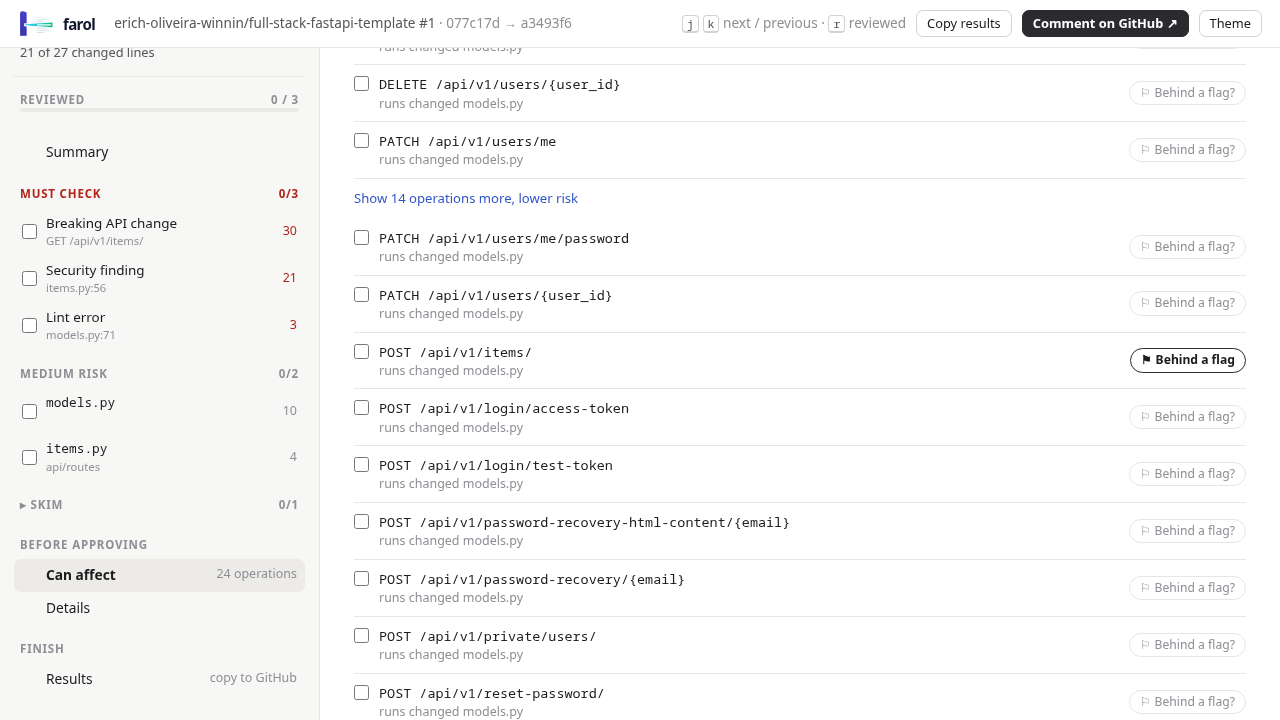
GET /items/statsto mark it as Tried by hand. - Expand the collapsed operations list ("Show 14 operations more") to locate
POST /api/v1/items/. - Click the feature flag button (
button.op-flag). The button state toggles to ⚑ Behind a flag (aria-pressed="true"), marking the route as shielded behind a runtime flag.
[!NOTE]
Toggling an operation to "Behind a flag" visually records the shielding in the review plan (aria-pressed="true"), while the underlying base score remains unchanged until the checklist items and modified files are acknowledged.
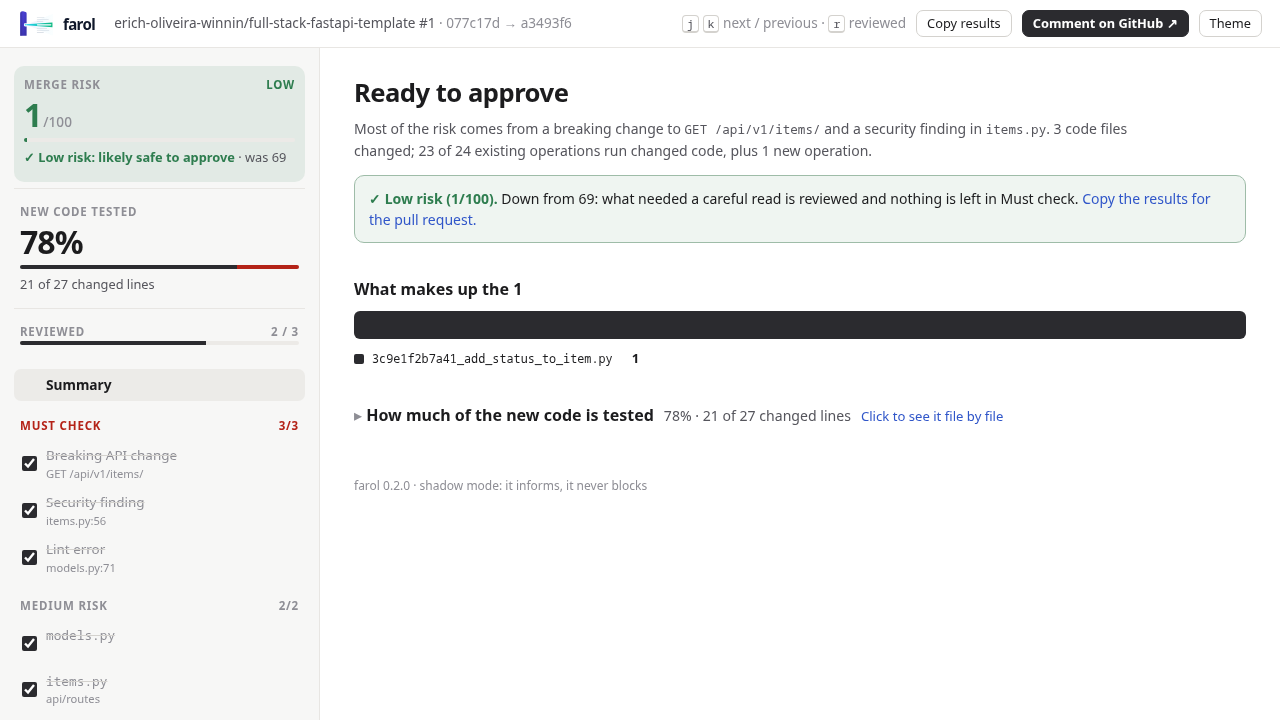
5. Dynamic Score Decrementing & "Ready to Approve" State
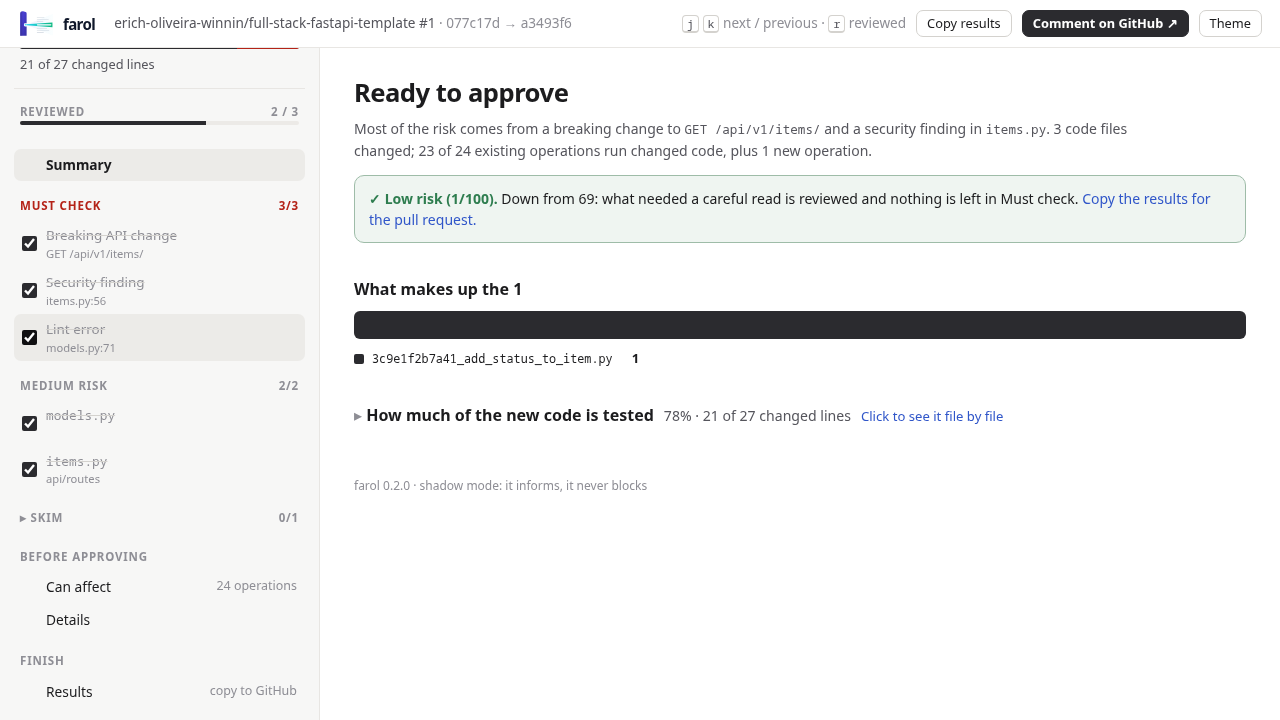
In the left rail under Must check, acknowledge the 3 critical items:
- Click
Breaking contract: items→ Score drops from 69 to 48. - Click
Security: SQL f-string in items.py→ Score drops from 48 to 26. - Under the file list ("MEDIUM RISK"), tick the review checkboxes for
items.pyandmodels.py→ Score drops from 26 to 21, then to 6. - Tick the remaining Must check item (
Lint error models.py:71) → Score drops to 1/100 ("✓ Low risk: likely safe to approve").
The status banner switches to "Ready to approve" (.metric.ready), giving the team an auditable verification trail.
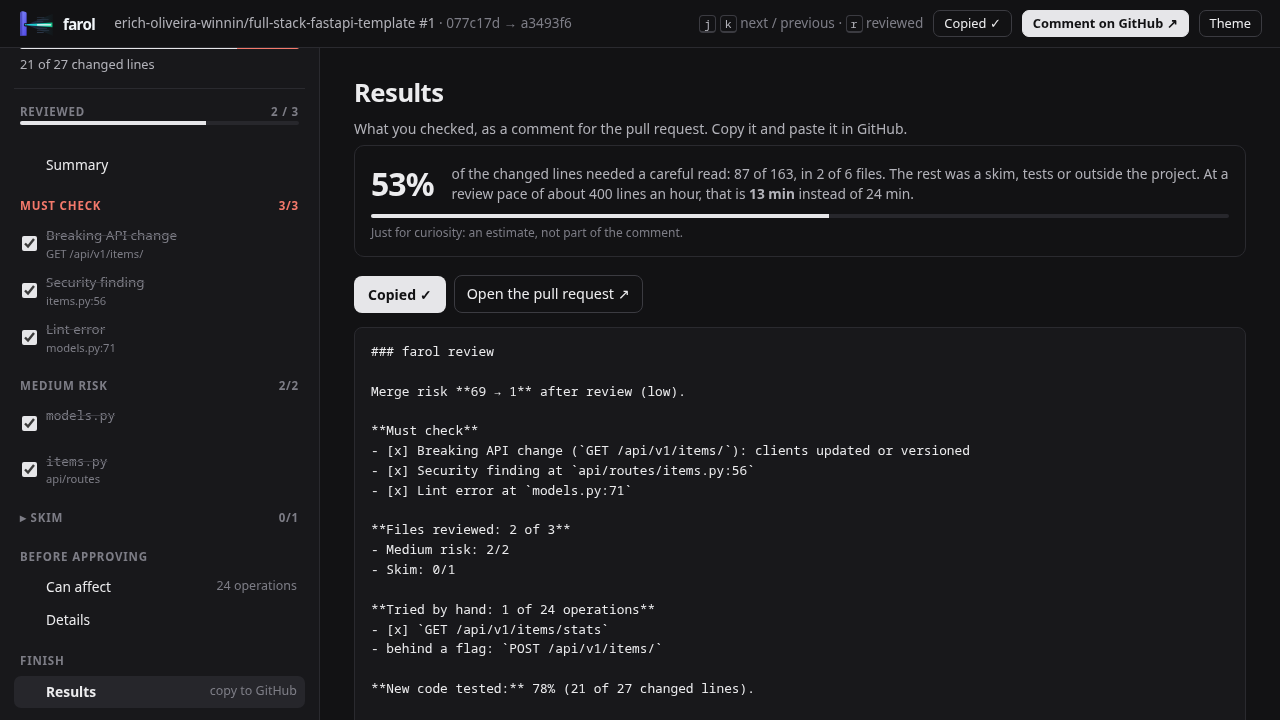
6. Dark Theme & One-Click PR Comment Export
- Theme Toggle: Click
button#themein the top bar to toggle between light and dark themes. The UI seamlessly adapts CSS variables to a dark palette (#121214). - Copy Results: Click the Copy results button (
button[data-copyresults]) in the top navigation header. Farol generates formatted Markdown on your clipboard:
### farol review · 1/100 (ready to approve)
- [x] Breaking contract: items
- [x] Security: SQL f-string in items.py
- [x] Lint error models.py:71
- [x] Reviewed backend/app/api/routes/items.py
- [x] Reviewed backend/app/models.py
Paste this markdown summary directly into your GitHub PR review comments for an instant, verifiable review record.
7. Framework Configuration Generator
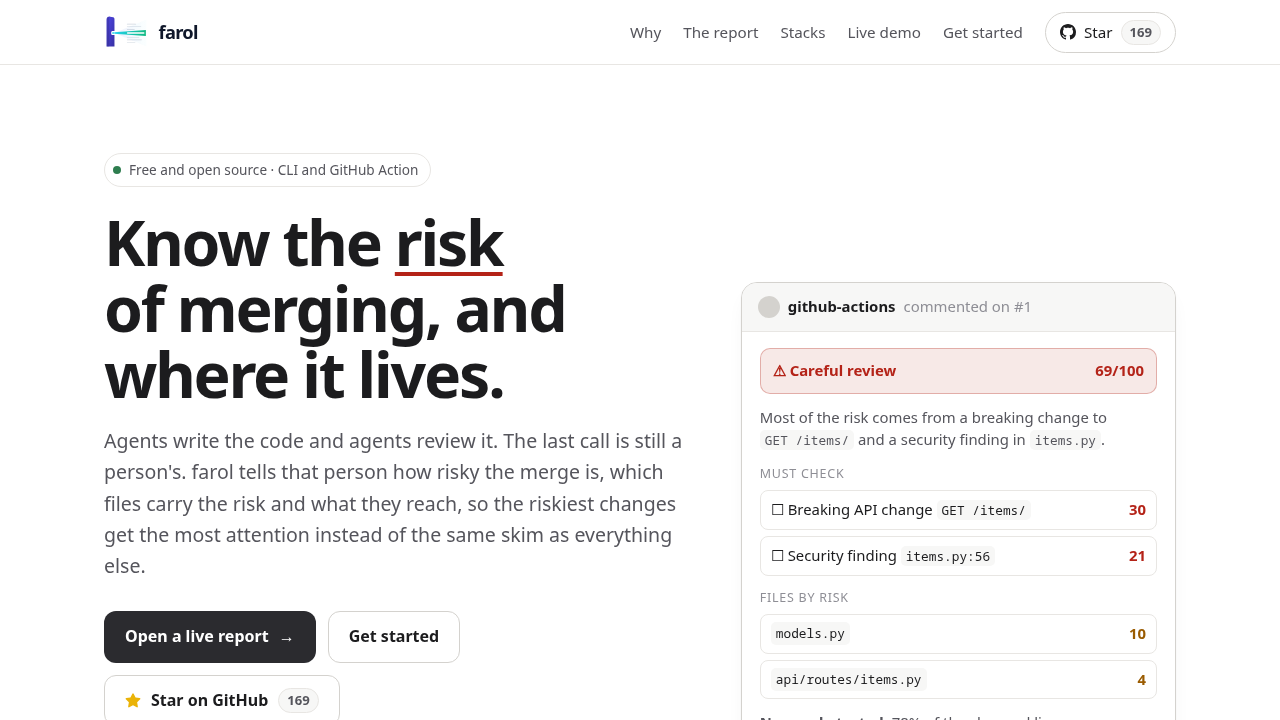
Navigate to http://localhost:3000/ to inspect Farol's documentation and configuration generator. Click across the framework tabs to view recommended farol.config.json specifications:
- React Router: Configured for frontend route trees.
- Next.js: App Router and Pages Router support.
- TanStack Router: File-based route tree analysis.
- TypeScript API: Fastify and Express backends.
- Go:
chi,gin, andnet/httproute inspection. - Python: FastAPI, Flask, and Celery task resolution.
8. Live Self-Analysis Dogfooding Report
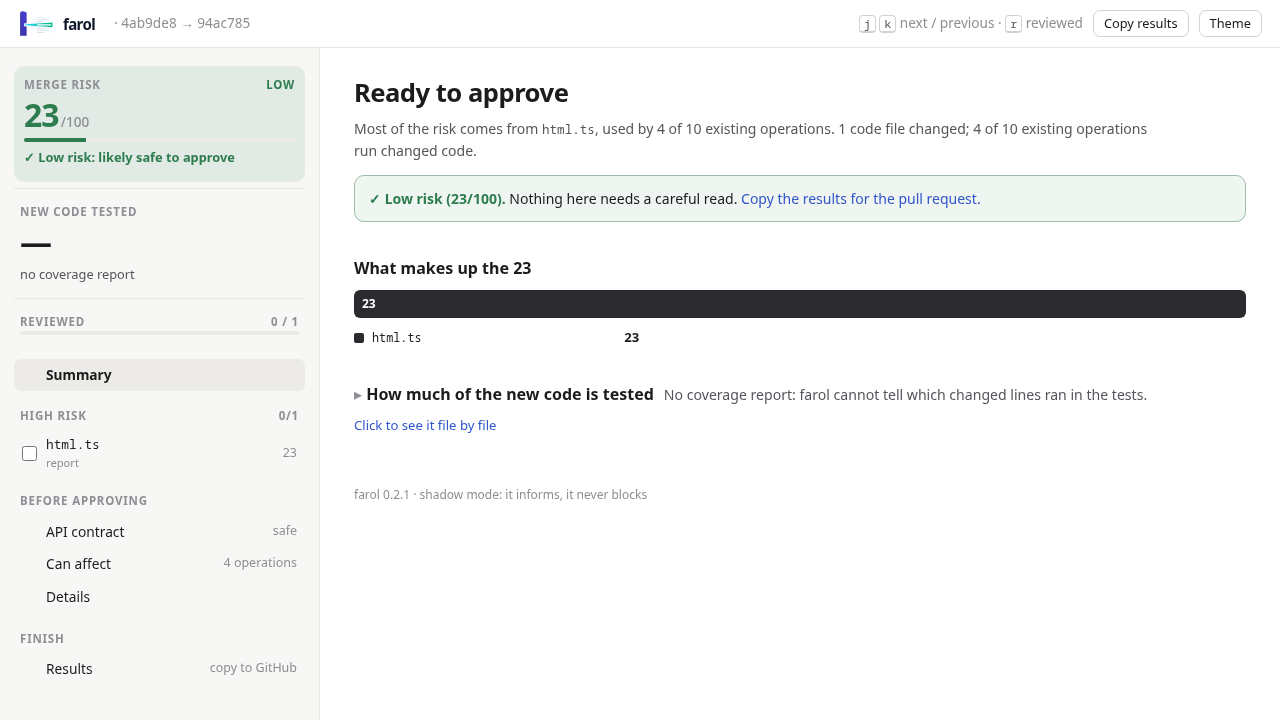
Navigate to http://localhost:3000/reports/farol.html to view the report Farol produced when analyzing its own codebase.
- The report shows a merge risk of 23/100 LOW ("✓ Low risk: likely safe to approve").
- It clearly demonstrates that modifying
src/report/html.tsaffects exactly 4 CLI subcommands:comment,html,report, andreviewers.
---
Verification
Execute these verification checks to confirm the deployment and CLI commands are operating correctly.
1. HTTP Endpoint Smoke Tests
Verify that all served documentation, demo workbenches, and reports return HTTP 200:
for endpoint in / /demo/backend.html /demo/frontend.html /reports/farol.html; do
  curl -s -o /dev/null -w "%{http_code} $endpoint\n" "http://localhost:3000$endpoint"
done
Expected output:
200 /
200 /demo/backend.html
200 /demo/frontend.html
200 /reports/farol.html
2. Workbench Page Title Verification
Ensure the FastAPI demo workbench renders properly without server errors:
PAGE=$(curl -s http://localhost:3000/demo/backend.html)
grep -q "farol · erich-oliveira-winnin" <<<"$PAGE" && echo "title_ok"
# Expected output: title_ok
3. CLI Entry Point Discovery
Run the CLI routes command against the Farol repository to verify static discovery of public entry points:
node dist/cli.js routes --cwd .Expected output: A JSON object enumerating Farol's 10 CLI entry points (CLI analyze, CLI report, CLI html, CLI routes, CLI impact, etc.).
4. Static Reachability & Impact Analysis
Verify compiler-based impact analysis on a modified source file:
node dist/cli.js impact src/report/html.ts --cwd .Expected output: A JSON structure confirming reachability from CLI subcommands (CLI comment, CLI html, CLI report, CLI reviewers).
---
Troubleshooting
The following grid outlines common issues, root causes, and verified solutions encountered when deploying and running Farol:
| Issue / Symptom | Root Cause | Verified Solution |
|---|---|---|
| `curl ... \ | grep -q` exits with return code 23 in scripts | Under set -o pipefail, grep -q exits on the first match, causing curl to terminate with SIGPIPE. |
Containerized CLI fails with farol: /workspace is not inside a git repository | Minimal Node container images (node:22-bookworm-slim) do not include git. Farol requires Git to inspect branches and commits. | Use a custom Dockerfile with git and ca-certificates installed, and set git config --global --add safe.directory '*'. |
CLI analyze fails with ref "master" is not a commit | The target repository uses main as its default branch rather than master. | Explicitly specify --base main (e.g. node dist/cli.js analyze --base main --head demo). |
Port 3000 already in use on host (bind: address already in use) | Another service or container is listening on port 3000. | Check listeners with `ss -ltn \ |
| Clicking "Behind a flag" button does not lower the risk score | Farol distinguishes between shielding an endpoint and approving changes. Flagging updates route metadata (aria-pressed="true"), while the score gauge decrements when Must Check items and files are reviewed. | Acknowledge the corresponding checklist items under Must check and mark high-risk files as reviewed in the left rail. |
Headless browser fails on Copy results with clipboard permission error | Headless Chromium restricts navigator.clipboard access without explicit user permission grants. | Grant clipboard permissions in Playwright: await context.grantPermissions(['clipboard-read', 'clipboard-write']). |
| Diff view does not show red untested line banners | No test coverage profile was supplied during farol analyze. | Pass Istanbul (coverage-final.json), Go (-coverprofile), or pytest JSON (--cov) coverage files using --coverage <path>. |
---
Teardown & Cleanup
To stop and remove the Docker Compose containers, networks, and temporary build images:
# Navigate to deployment directory
cd deploy

# Stop and remove containers and network
docker compose down -v --remove-orphans

# Clean up built images
docker image rm farol-web farol-cli 2>/dev/null || true
---
Assumptions & Decisions
- Pre-Bundled Standalone Executable: Farol commits a pre-bundled standalone executable at
dist/cli.js(tsupbundle, Node 22 ESM target). Runningnode dist/cli.jsdirectly avoids runningnpm install, avoiding host package pollution while guaranteeing deterministic CLI behavior. - Scratch Clone for Branch Analysis: Shallow git clones with single commits cannot be compared with
analyze --base main --head HEAD. Running the analysis against an isolated scratch clone (sandbox/) with a dedicateddemobranch allows generating realistic, live reports without modifying the upstream source repository. - Containerized CLI Requirements: Farol shells out to native Git commands. When containerizing the CLI under Docker Compose, standard slim Node images fail. A dedicated
web/cli.Dockerfilewith Git pre-installed andsafe.directory '*'configured is required for containerized execution. - Accurate Workbench Metrics: The FastAPI backend demo (
docs/demo/backend.html) features a diff test coverage of 78% (21 of 27 lines tested) with untested code on lines 38–39, 3 Must Check items (contract break, SQL f-string, and lint error onmodels.py:71), and transitions to "Ready to approve" at 1/100 risk score. - Feature Flag Score Behavior: Marking an endpoint as "Behind a flag" updates route state (
⚑ Behind a flag,aria-pressed="true") for deployment planning, but does not decrement the risk score without checking the risk review checklist. - Port Allocation & Loopback Binding: Farol's CLI does not bind network ports. The web documentation container binds exclusively to
127.0.0.1:3000to prevent unintended external exposure on host interfaces. - GitHub Flavored Markdown Tables for Ghost Conversion: Ghost cannot render raw pipe tables in standard Markdown blocks. All grids and troubleshooting workflows are formatted using strict GitHub-flavored Markdown tables, ensuring
ghost-draftcleanly transforms them into native Ghost HTML table cards.
Get the Unified Homelab Stack Compose Pack
One-command multi-container Compose files (Full *arr Stack, Prometheus + Grafana + ntfy Monitoring, and Homelab Auth) plus new verified deploys once a week.